

EWWW Image Optimizer is one of the most widely used image performance plugins in the WordPress ecosystem, built to solve a problem most site owners underestimate until it costs them: oversized, unoptimized images quietly dragging down page speed, eating storage, and hurting conversions. Since launching in 2012, EWWW IO has grown into a full image optimization platform covering four areas: compression, modern format conversion to WebP and AVIF, lazy loading, and automatic scaling. What started as a tool to make image optimization work reliably on shared hosting is now a performance toolkit used by everyone from small business owners to agencies running hundreds of sites.
Beyond the plugin itself, creator Shane Bishop has built an entire ecosystem around web performance: the Compress API for offloading optimization to dedicated servers, the Easy IO CDN for hands-off image delivery, and the SWIS Performance plugin for broader site speed work. With Imsanity, Force Regenerate Thumbnails, and S3 Image Optimizer alongside them, Shane has spent more than fourteen years on a single mission: helping WordPress site owners make their sites as fast as possible without the technical headaches.
When somebody who spends every working day measuring web performance evaluates a host, the bar is different. Generic benchmarks and marketing claims do not get far. Shane needed an environment that could meet the standard he sets for his own customers: real performance under real conditions, not a cached homepage score. After years on a well-known managed WordPress host, he found the price-to-performance ratio falling short of what his sites actually demanded.
In this case study, Shane shares what he measured after moving EWWW IO to Levamo, why security and support weighed as heavily as speed, and what it means for a performance-obsessed developer to get SSH access and LiteSpeed caching flexibility on a fully managed platform.
Levamo: Can you tell us a bit about yourself and your role?
Shane: I'm Shane Bishop, creator of EWWW Image Optimizer and several other performance and image-related plugins. I've been using WordPress for about twenty years, originally for a personal blog, and then at work, and now it is my work. I spend most of my time working on EWWW IO and SWIS Performance, along with our premium image compression service and Easy IO CDN. But I also work on several other WP plugins: Imsanity, Force Regenerate Thumbnails, and S3 Image Optimizer.
Levamo: Give us a quick intro to EWWW Image Optimizer. What does it do, and who is it built for?
Shane: EWWW IO does a lot, but most of it boils down to four main areas: compressing images, which makes sites faster and saves disk space, converting to modern formats like WebP and AVIF, lazy loading, and automatic scaling to keep images right-sized for any device.
We work to make it easy enough for a small business owner, thus our Easy IO CDN, but it started out as a tool to make life easier for folks managing multiple sites. As such, it has a lot of flexibility to meet the diverse needs of agencies and developers, with a special focus on image quality.
Levamo: What hosting were you using before Levamo, and what led you to look for an alternative?
Shane: We were using WP Engine prior to making the move to Levamo, and two main things got us looking elsewhere. The first was price, the second was that it didn't seem like we were getting the performance we were paying for. Response time was good, but not great, and the site seemed to get bogged down sometimes.
Naturally, as someone who does website performance every day, I put a lot of emphasis on server performance. With Levamo, we have a much better balance between price and performance, and I don't have to worry about it bogging down.
Levamo: What made you choose Levamo over other managed WordPress hosts?
Shane: There were a few things that I really liked about Levamo. As I mentioned, the performance was a big one as they outperformed both WP Engine and Rocket.net hosting.
Support was another thing I appreciated, as their team was always quick to respond and super helpful. They aren't perfect, but they go above and beyond when it matters.
The last thing that I really liked was the focus on security. I've seen cheap and free tools used by budget web hosts, and likewise seen a variety of issues from those hosts trying to save money. When I first saw Levamo used Monarx, I thought it might be the free version, but it isn't, they include the full paid tool for the best protection. You can also get access to Patchstack for super cheap, which I'm a big fan of.
Levamo: Have you noticed any measurable improvements since migrating?
Shane: I've done a few measurements on both platforms, one of which was measuring the load time for the home page while logged in. With a good caching setup, most servers can give you pretty good TTFB results. However, when you're logged in, you get a better feel for the power of your server. Measured by Query Monitor, Levamo is about 30% faster than WP Engine, at 530ms versus 700ms.
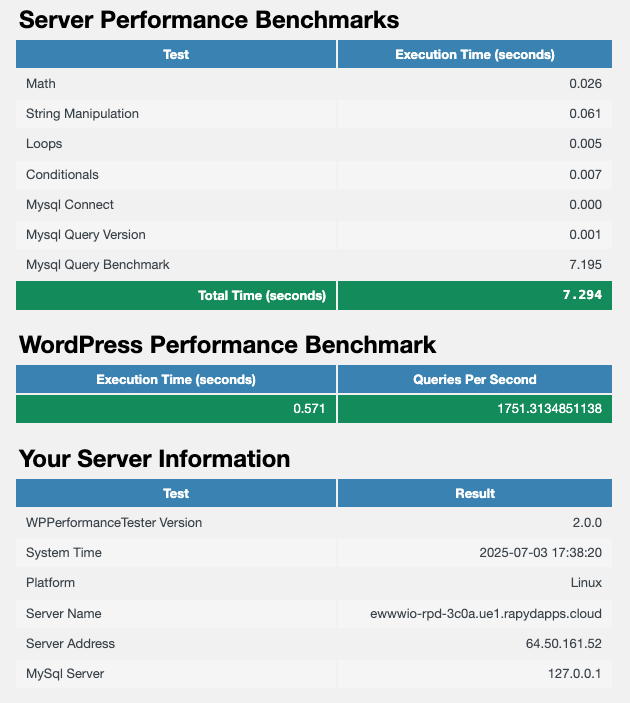
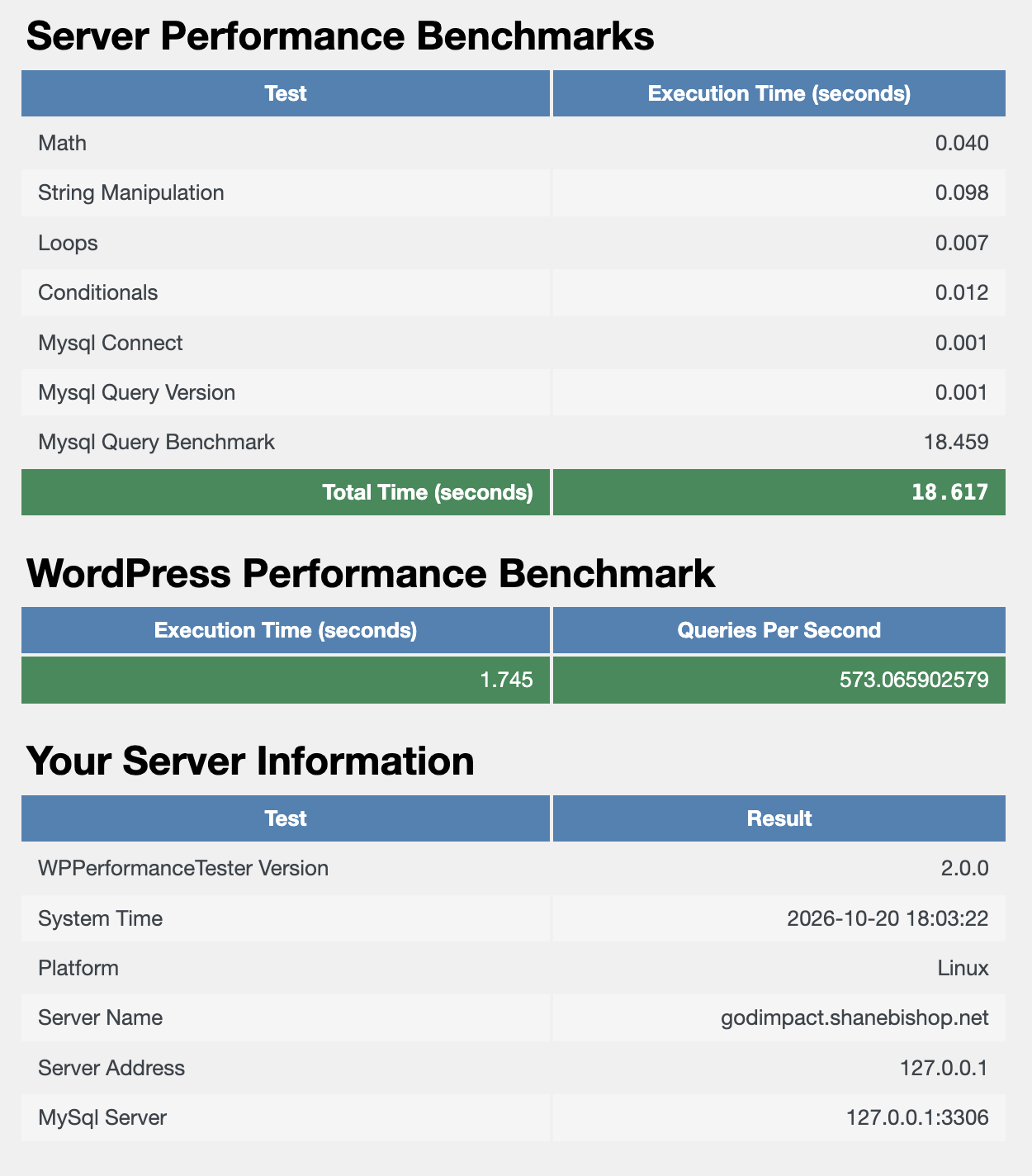
The other test I did was using a benchmark plugin, and here Levamo was about 3x better than WP Engine.
Shane ran WP Performance Tester on both platforms. His results:
| Benchmark | WP Engine | Levamo |
|---|---|---|
| Logged-in home page load (Query Monitor) | 700ms | 530ms |
| Server benchmark, total execution time | 18.617s | 7.294s |
| MySQL query benchmark | 18.459s | 7.195s |
| WordPress benchmark, execution time | 1.745s | 0.571s |
| WordPress benchmark, queries per second | 573 | 1,751 |
The queries-per-second figure is the one Shane is pointing at with "about 3x better." These are his own measurements, run with WP Performance Tester, not ours. Here are the raw results he sent us.
On Levamo:
On WP Engine:
Levamo: How has your experience been with Levamo's support team?
Shane: As I mentioned, this was an important factor in choosing Levamo, because I can't stand poor customer support.
I'll give a few examples, and I'll pick on an annoying bug first, which is that the log viewer has some issues with time zones. I raised the issue via chat, and they got me the log info right away and reminded me I could access the raw logs via SSH anytime. That access is actually something I missed on WPE, but I'll get into that more in a bit.
In another case, we needed a PHP extension that wasn't active by default. I asked about it, figuring it would take a few days for them to do anything with it. Instead, they were right on top of it, and got the extension activated for the site within minutes.
Just yesterday, I was trying to sort out something with caching that I was testing on our staging site, and staging is easy to set up with Levamo. I couldn't quite figure out what was going on, so I got on the chat with Max from the support team. They dug into it and within about a half hour, helped me figure out exactly what was going on.
Levamo: Is there a specific Levamo feature that's been a game-changer for your workflow?
Shane: This might be kind of a boring example, but having direct SSH access again has been nice. It's probably my server admin background coming through, but there's nothing like having direct access to the logs so you can search around and see all the details.
One other change I've appreciated is the flexibility of the server-side caching. That was one area where I wasn't satisfied with the WP Engine implementation. LiteSpeed server caching is fast and you can customize it however you like.
Somewhat fortuitously, we added LiteSpeed compatibility into our SWIS Performance plugin earlier this year, so this has been a great opportunity to polish that integration, and now it's better than ever.
Levamo: Would you recommend Levamo to other WordPress developers and plugin authors?
Shane: Certainly! As a plugin developer, I need the performance to scale, and Levamo provides the resources to keep things running smoothly.