You built your site on Hostinger. It was the right call. The price was low, the setup was simple, and for a while, everything ran fine.
Then your WooCommerce store started processing real orders. Or your membership site crossed a few hundred active members. Or your LearnDash course hit its first live cohort, and 200 students all logged in at once. The site slowed, the checkout lagged, and you realized you were sharing CPU with a couple hundred other websites on the same server.
That's the wall. Hostinger doesn't break. You outgrow it.
This post breaks down the real differences: infrastructure, pricing (including the fine print), security, performance, and support depth. Everything sourced from each platform's current pricing and feature pages.
Levamo vs Hostinger at a Glance
Both platforms run LiteSpeed web servers. That's where the overlap ends. Levamo was born inside BuddyBoss after years of watching traditional hosts buckle under logged-in community traffic. Every plan includes enterprise-grade infrastructure designed for dynamic WordPress workloads: stores, communities, courses, and membership sites.
| Feature |
Levamo |
Hostinger |
| Web server |
OpenLiteSpeed / HTTP3 |
LiteSpeed |
| Object caching |
KeyDB and Redis (Business+) |
Available on Cloud plans only |
| CDN |
Enterprise Cloudflare, 300+ PoPs (all plans) |
Proprietary CDN, ~5 disclosed PoPs |
| WAF / DDoS protection |
Cloudflare WAF + DDoS (all plans) |
Basic WAF + DDoS |
| Malware scanning |
Monarx (server-level, continuous) |
Basic malware scanner |
| Virtual patching |
Advanced SiteShield (Patchstack, $4/site/mo) |
Not available |
| Container isolation |
Yes, all plans |
No (shared resources on most plans) |
| PHP workers |
Auto-scaling |
Fixed (100 on Cloud Startup) |
| AI site management |
Built-in dashboard (ChatGPT, Claude, Cursor) |
Hostinger Agent (built-in) |
| Staging |
1-click, all plans |
1-click, all plans |
Our published benchmarks come from our performance benchmarks. Results vary by site, stack, and traffic.
Five Hostinger Pain Points That Push Growing WordPress Sites to Switch
Hostinger works well for a certain stage of growth. These are the five walls that site owners hit most often when their traffic, revenue, or complexity outpaces what shared hosting can deliver.
1. Shared Servers, Shared Slowdowns
Hostinger's Premium ($2.99/mo promo) and Business ($3.99/mo promo) WordPress plans run on shared servers. Your site shares CPU, RAM, and I/O with dozens or hundreds of other sites on the same physical machine. Hostinger doesn't publish how many sites share a server, and that's the point: you don't know, and you can't control it.
When another site on your server gets a traffic spike, your store's checkout page slows down. When a neighboring site runs a poorly optimized plugin that maxes out CPU, your membership portal lags. This is the "noisy neighbor" problem, and it's not a flaw in Hostinger's service. It's how shared hosting works.
Hostinger's Cloud plans ($7.99/mo promo, $25.99/mo at renewal) offer dedicated CPU and RAM, which helps. But even Cloud plans don't provide container isolation. Your files, processes, and resources still sit within a shared environment.
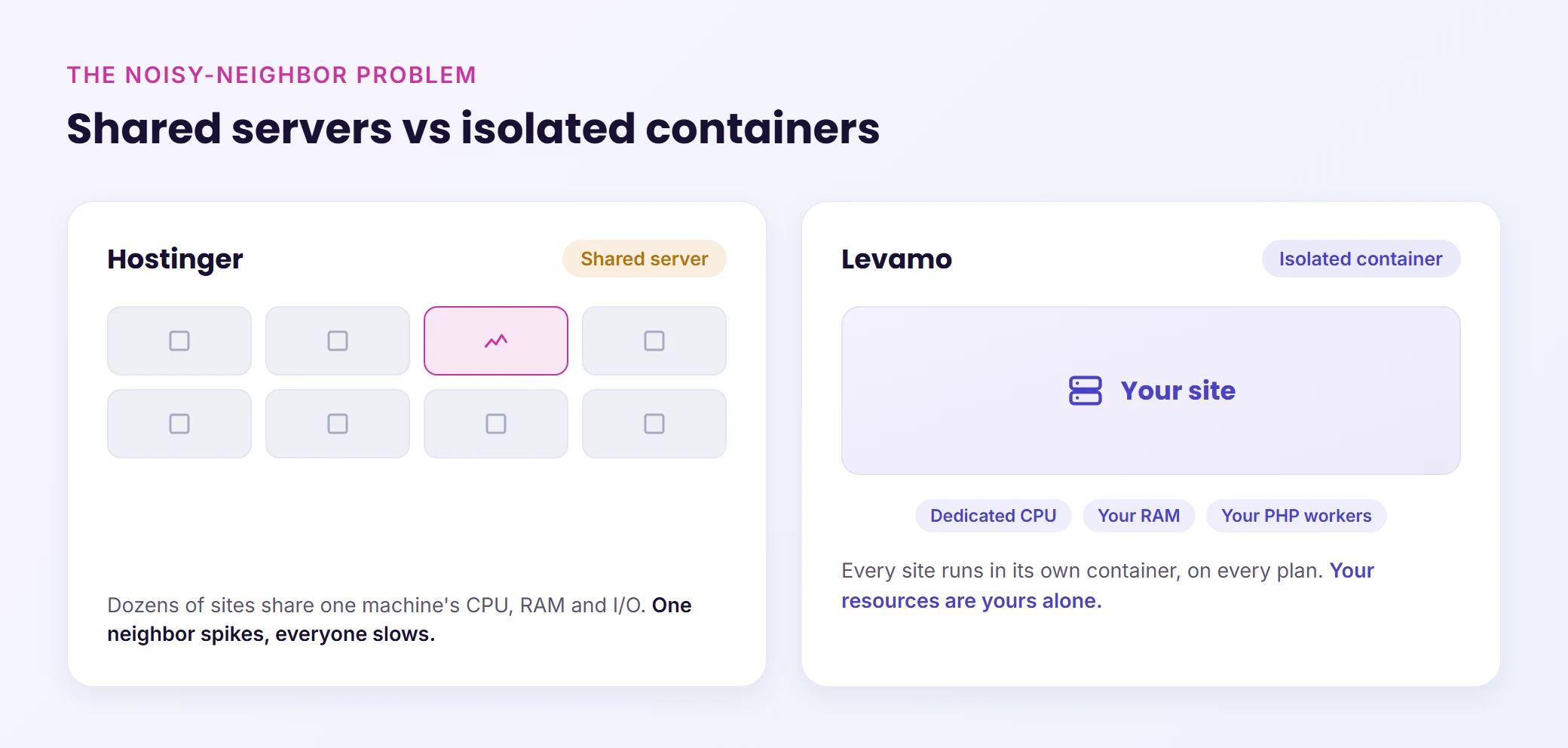
Levamo runs every site in its own isolated container on every plan, including the $35/mo Starter. Your PHP workers, your memory allocation, your I/O. No other customer's traffic spike touches your site's performance. When 300 students log into your course at once, the only variable is your own traffic, not someone else's WooCommerce flash sale three containers over.
2. The 48-Month Pricing Lock
Hostinger's headline pricing is genuinely impressive: $2.99/mo for WordPress hosting. But that price requires a 48-month commitment, paid upfront. That's $143.52 for four years before you've even installed WordPress.
Here's the full picture:
| Plan |
Promo price (48 months) |
Renewal price |
Increase |
| Premium |
$2.99/mo |
$10.99/mo |
3.7x |
| Business |
$3.99/mo |
$16.99/mo |
4.3x |
| Cloud Startup |
$7.99/mo |
$25.99/mo |
3.3x |
Most hosting comparison sites quote that $2.99 number. Few mention that you're locked in for four years, or that your renewal rate nearly quadruples.
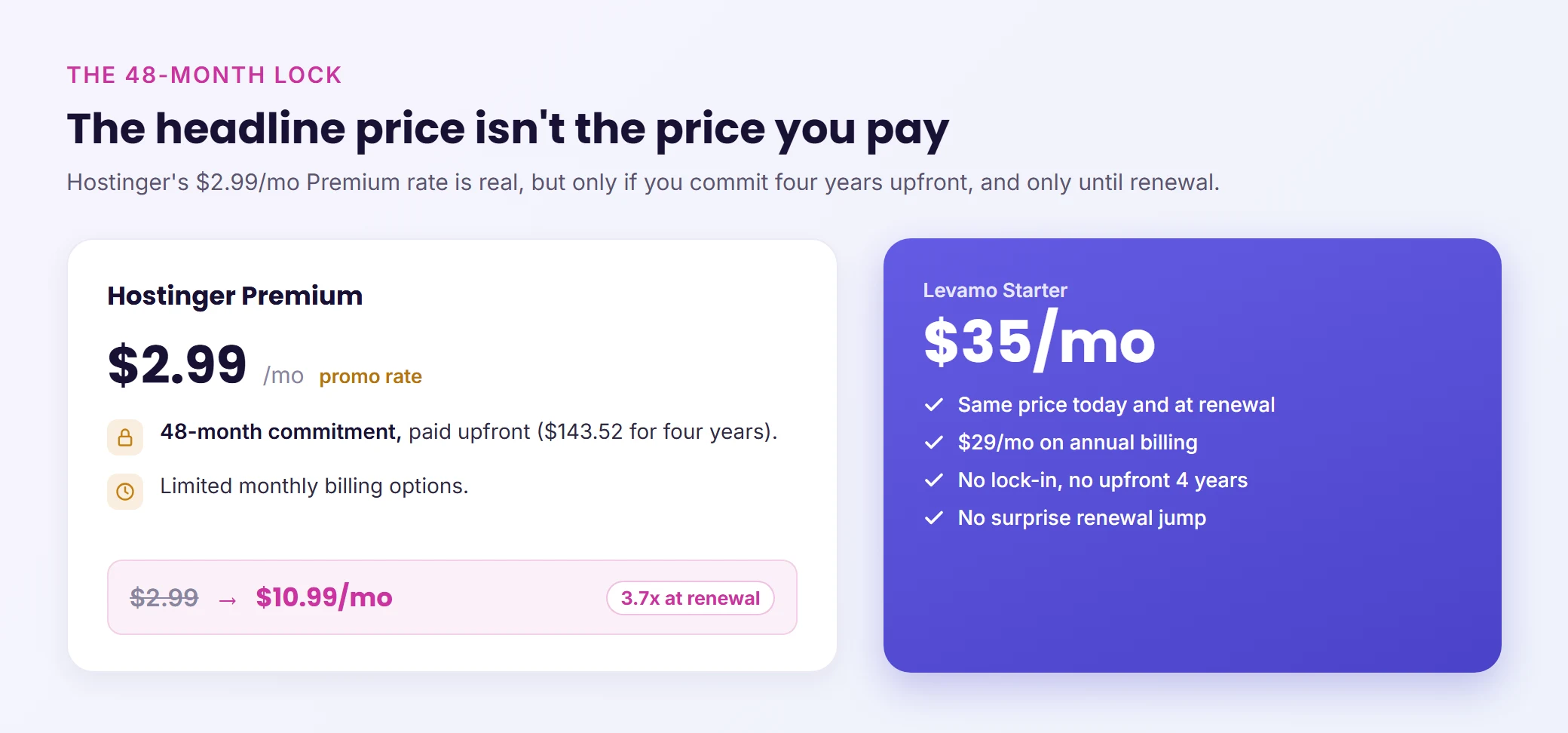
Levamo's pricing is straightforward. The Starter plan is $35/mo on monthly billing, $29/mo on annual billing. Those are the prices today, tomorrow, and at renewal. No promotional bait, no 48-month commitment, no surprise jump after year one.
Is Levamo more expensive? Yes, on the sticker price. Whether it's more expensive per dollar of value depends on what you need that hosting to do, and we'll get to that in the pricing scenarios below.
3. A Proprietary CDN With a Handful of Locations
Hostinger built their own CDN. Their blog discloses PoP locations in the UK, US, Singapore, Brazil, and France. That's five confirmed locations serving a global audience.
For a personal blog with mostly local traffic, five PoPs might be enough. For a WooCommerce store shipping internationally, a membership site with members across time zones, or a course platform with students on three continents, five PoPs leaves large geographic gaps where your visitors hit slower routes.
Every Levamo plan (including the $35/mo Starter) includes Enterprise Cloudflare CDN with 300+ points of presence across 100+ countries. That's not an add-on, not an upgrade, not a separate subscription. It's the CDN on every plan, paired with Cloudflare's Argo Smart Routing, HTTP/3, and full WAF/DDoS protection at the edge.
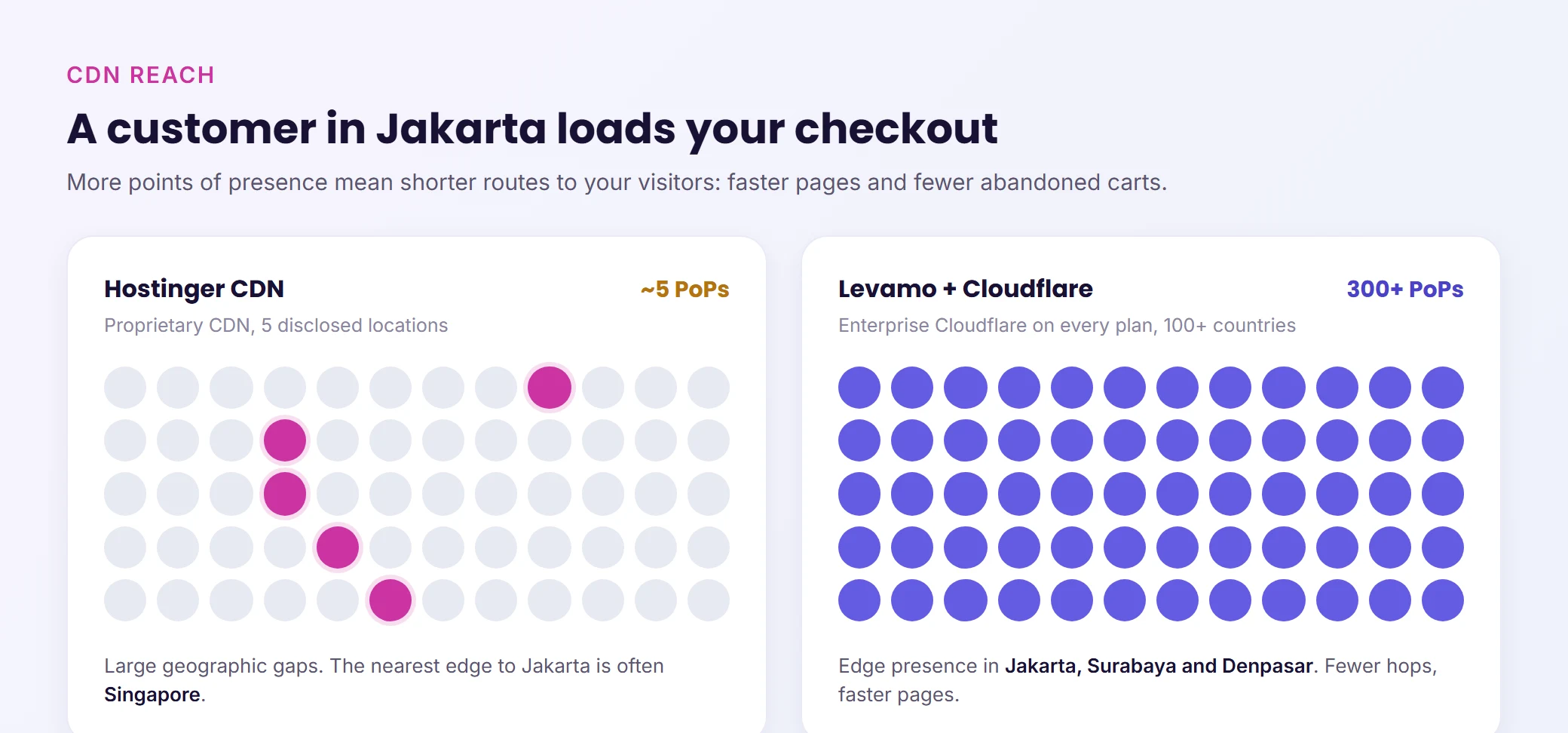
The practical difference: a customer in Jakarta loading your checkout page. On Hostinger's CDN, the nearest PoP might be Singapore. On Cloudflare Enterprise, there are PoPs in Jakarta, Surabaya, and Denpasar. Fewer hops, faster pages, fewer abandoned carts.
4. Security That Stops at Scanning
Hostinger includes a basic malware scanner and WAF across plans. For a simple blog, that's adequate. For a WooCommerce store processing payments or a membership site storing personal data, "basic" leaves gaps.
What Hostinger's security stack is missing:
- Virtual patching. When a plugin vulnerability is disclosed, Levamo's Advanced SiteShield (powered by Patchstack, $4/site/mo add-on) can apply a virtual patch within hours, before the plugin developer releases an update. Hostinger has no equivalent. Your only option is to wait for the plugin update and hope nobody exploits the gap.
- Vulnerability feed with priority levels. SiteShield gives you a real-time feed of vulnerabilities affecting your specific plugins, themes, and WordPress core, ranked by severity. Hostinger's scanner tells you if malware is already on your site. That's detection after compromise, not prevention.
- Server-level malware scanning. Levamo runs Monarx at the server level, scanning continuously across files, processes, and databases. This catches threats that a WordPress-layer scanner misses entirely.
- 2FA enforcement with team admin controls. Levamo supports authenticator-app 2FA with admin-enforced policies across your team, supporting PCI DSS 4.0.1 compliance requirements. Hostinger offers 2FA for your hosting account, but there's no team-level enforcement or compliance-grade audit trail.
For stores handling payment data, membership sites managing personal information, or any site in a regulated industry, the security gap between "basic scanner" and "prevention-first stack" is the gap between reacting to breaches and preventing them.
5. General-Purpose Support vs. WordPress Specialists
Hostinger serves millions of customers across shared hosting, VPS, cloud, email, domains, website builder, and AI tools. That scale is impressive, and their support team handles the full breadth of those products.
Levamo's support team does one thing: WordPress. And within WordPress, they specialize in the stacks that generate the most support complexity: WooCommerce stores with payment gateway issues, BuddyBoss communities with activity stream performance problems, LearnDash courses with enrollment and drip content bugs, MemberPress sites with content restriction conflicts.
The difference shows up at 2 a.m. when your WooCommerce checkout starts throwing gateway errors during a promotion. On Levamo, you get a live chat response in under a minute from someone who has debugged that exact Stripe/WooCommerce conflict before. They'll check your PHP error logs, identify the hook conflict, and walk you through the fix or apply it themselves.
Levamo's support carries a 4.6/5 CSAT score across 24/7/365 live chat. Not a chatbot. Not a ticket queue. A person who knows your stack.
What Each Workload Actually Demands
Hostinger costs less. That's not a debate, and we're not going to pretend otherwise. The question worth asking is different: when your site runs a real workload (processing orders, serving logged-in members, handling a live cohort), can the hosting keep up?
Three scenarios. Same question each time.
Scenario 1: Store Owner Running a WooCommerce Site
Your store processes real orders. Customers browse products, add to cart, enter payment details, and wait for confirmation. Every one of those pages is dynamic: no page cache helps on cart, checkout, or product search. Your wp-admin is where you spend your day: processing orders, editing products, pulling sales reports.
Here's what that workload needs and where the two platforms diverge:
| What your store needs |
Levamo |
Hostinger |
| Fast checkout under load |
KeyDB object caching keeps cart and checkout responses sub-second. Auto-scaling PHP workers absorb sale-day traffic spikes. |
Shared server resources. No server-level object caching on most plans. Fixed PHP workers. |
| wp-admin that keeps up with you |
wp-admin holds 0.8s response times under a 4x traffic spike. Processing orders, editing products, and pulling reports stays fast even during your busiest sale. |
Shared CPU and RAM. wp-admin speed depends on what other sites on your server are doing at that moment. |
| CDN for international customers |
Enterprise Cloudflare, 300+ PoPs, Argo Smart Routing. Checkout page assets served from the nearest edge. |
Proprietary CDN with ~5 disclosed PoP locations. Customers in regions outside those five hit slower routes. |
| Security for payment data |
Monarx server-level scanning (all plans), SiteShield virtual patching ($4/mo add-on), 2FA enforcement with PCI DSS 4.0.1 support. |
Basic malware scanner and WAF. No virtual patching. No compliance-grade 2FA enforcement. |
| Container isolation |
Your store runs in its own container. Another customer's traffic spike doesn't touch your checkout. |
Shared environment. Your checkout performance depends on your neighbors' traffic. |
A store doing $8K/month loses more from one slow checkout during a promotion than the annual difference between these two platforms. The front end might look similar on a speed test. The difference shows up in wp-admin at 3 p.m. on a Wednesday when you're processing 40 orders and the site next door on your server is running a flash sale.
Scenario 2: Agency Managing 5 Client Sites
You run five client sites: two WooCommerce stores, a membership site, a LearnDash course platform, and a corporate site. Your reputation depends on all five being fast, secure, and online. The nightmare scenario isn't a server crash. It's Client A's traffic spike silently slowing Client B's checkout, and Client B calling you before you even know there's a problem.
This isn't a pricing question. It's an architecture question.
| What your agency needs |
Levamo |
Hostinger |
| Per-client isolation |
Every client runs in its own container. Client A's Black Friday spike is Client A's traffic. Client B never feels it. |
All sites share the same server environment. One client's traffic affects every other client on the server. |
| Fast wp-admin across all 5 sites |
Each wp-admin has its own resources. You can update products on Client A's store while Client B's membership site handles a traffic spike, and neither slows down. |
Shared CPU and RAM across all sites. When one wp-admin gets heavy (bulk product edits, report generation), the others feel it. |
| Safe updates without surprises |
1-click staging that mirrors production. Test every update on a clone before it touches the live site. |
Staging available, but without container isolation, staging itself competes for the same shared resources. |
| One support team that knows WordPress |
24/7 live chat, sub-minute response, from engineers who specialize in WooCommerce, BuddyBoss, and LearnDash. When a client's payment gateway breaks at midnight, you get someone who's seen that exact conflict before. |
24/7 support covering all Hostinger products: shared hosting, VPS, domains, email, website builder. WordPress is one of many things they support. |
| Migrate all 5 without downtime drama |
Free white-glove migration for every site. The team handles files, databases, DNS, SSL, and monitors for 48 hours post-move. |
Free automated migration. You handle the testing and troubleshooting. |
The real cost of shared hosting for an agency isn't the monthly bill. It's the hours you spend diagnosing cross-site performance issues, the client calls when wp-admin crawls during a content update, and the reputational hit when a site goes down because another tenant's traffic spiked.
Scenario 3: Course Creator Running BuddyBoss + LearnDash + WooCommerce
You sell online courses through LearnDash, take payments through WooCommerce, and run your student community on BuddyBoss. Every page your students see is logged-in: lesson content, quiz submissions, forum posts, progress tracking, course purchases. None of it is cacheable. Every single request hits PHP and your database.
This isn't a question of which host is cheaper. It's a question of which host can run this stack without falling over during a cohort launch.
| What happens during a live cohort (200 students) |
Levamo |
Hostinger |
| Students load lesson pages |
KeyDB object cache serves repeated database queries from memory. Pages stay fast even with 200 concurrent logged-in sessions. |
No server-level object caching. Every page load queries the database directly. Response times climb as concurrent sessions increase. |
| Students submit quizzes simultaneously |
Auto-scaling PHP workers expand to handle the burst. Quiz submissions process without queuing. |
Fixed pool of 100 PHP workers shared across all sites on the server. At 200 concurrent students, requests start queuing. |
| Students post in the BuddyBoss community |
Activity stream queries are database-heavy. Object caching keeps feed loads fast. Support team has optimized these exact queries on hundreds of BuddyBoss sites. |
Activity feeds hit the database on every load. No BuddyBoss-specific optimization or support expertise. |
| A student buys an add-on course mid-session |
WooCommerce checkout runs in its own isolated container. The 199 other students browsing lessons don't affect checkout speed. |
Checkout shares resources with every other page request, including the 199 other students' lesson loads and the other sites on the server. |
| You check wp-admin during the session |
wp-admin stays responsive at 0.8s even under a 4x traffic spike. You can monitor enrollment, check revenue, and respond to student questions without waiting. |
wp-admin competes for the same shared resources as every student session. During peak load, the dashboard where you manage your business is the first thing to slow down. |
Levamo was born inside BuddyBoss specifically because this stack kept overwhelming traditional hosts. The support team has debugged BuddyBoss activity stream queries, LearnDash quiz submission bottlenecks, and WooCommerce subscription renewal spikes on hundreds of sites. That expertise isn't a marketing line. It's the reason the company exists.
Full Feature Comparison
Every row sourced from each platform's current pricing and feature pages.
| Feature |
Levamo |
Hostinger |
| Renewal price |
Same as listed |
$10.99/mo+ (3.3x to 4.3x increase) |
| Billing flexibility |
Monthly or annual |
1, 12, 24, or 48-month terms |
| Web server |
OpenLiteSpeed / HTTP3 |
LiteSpeed |
| CDN |
Enterprise Cloudflare, 300+ PoPs |
Proprietary CDN, ~5 disclosed PoPs |
| CDN features |
Argo Smart Routing, HTTP/3, edge WAF |
Basic caching and compression |
| Object caching |
KeyDB and Redis (Business+) |
Available on Cloud plans |
| Container isolation |
All plans |
Not available |
| PHP workers |
Auto-scaling |
Fixed (100 on Cloud Startup) |
| Backups (entry plan) |
Daily |
Weekly |
| Hourly backups |
$10/mo add-on |
Not available |
| On-demand snapshots |
Yes |
Cloud plans only |
| Staging |
1-click, all plans |
1-click, all plans |
| Free SSL |
Yes, all plans |
Yes, all plans |
| WAF / DDoS |
Cloudflare Enterprise WAF + DDoS |
Basic WAF + DDoS protection |
| Malware scanning |
Monarx (server-level, continuous) |
Built-in malware scanner |
| Virtual patching |
SiteShield (Patchstack, $4/site/mo) |
Not available |
| 2FA enforcement |
Authenticator-app, team-admin enforced |
Account-level 2FA |
| AI site management |
Dashboard AI (ChatGPT, Claude, Cursor) |
Hostinger Agent |
| Migration |
Free white-glove, 48 business hours |
Free, automated |
| Support |
24/7 live chat, WordPress specialists |
24/7 support (general) |
| Uptime SLA |
99.9% |
99.9% |
- Enterprise Cloudflare CDN (300+ PoPs) on every plan, including Starter. Hostinger uses a proprietary CDN with limited global coverage.
- Container isolation on every plan. Your site's resources are yours alone. Hostinger's shared and Cloud plans use shared environments.
- KeyDB and Redis object caching on Business plans and above. Critical for WooCommerce cart performance and logged-in user experience. Not confirmed as standard on Hostinger Cloud.
- Monarx server-level malware scanning across all plans. Scans files, processes, and databases continuously at the server layer. Hostinger offers a WordPress-level scanner.
- Auto-scaling PHP workers that increase with demand. Hostinger Cloud Startup provides a fixed pool of 100 workers.
- White-glove migration by WordPress specialists within 48 business hours, with minimal downtime. Hostinger offers automated migration tools.
- Sub-minute live chat support from a team that specializes in WooCommerce, BuddyBoss, LearnDash, and MemberPress stacks.
- Advanced SiteShield ($4/site/mo add-on) with 16,000+ virtual patches, vulnerability feeds, full stack auditing, and firewall controls powered by Patchstack. No equivalent exists on Hostinger.
AI-Powered Site Management (Levamo Exclusive)
Both Levamo and Hostinger have invested in AI, but the approaches are fundamentally different.
Hostinger's Agent lives inside their hPanel dashboard and focuses on site building, troubleshooting, and optimization within Hostinger's ecosystem. It's useful for getting started with a new site or diagnosing basic issues.
Levamo's AI Management is built into the dashboard and lets you connect your own AI tools (ChatGPT, Claude, or Cursor) directly to your WordPress site. You manage your site through conversation: update plugins, edit content, troubleshoot issues, audit performance, and make design changes. Every action goes through an approval flow, so nothing changes on your live site without your explicit sign-off.
The key difference: Levamo's approach gives you full control over which AI model you use, with your own API keys, applied to your actual WordPress site through real WP-CLI commands and REST API calls. It's not a chatbot answering hosting questions. It's a management layer that turns natural language into WordPress actions.
Per-member API key support means your team can each connect their preferred AI tool without sharing credentials. No extra subscription, no separate plugin, no setup wizard. It's part of the dashboard.
Where Hostinger Genuinely Holds Up
An honest comparison acknowledges where the other platform excels. Hostinger is the right fit in specific scenarios, and recommending a switch when it isn't would waste your time.
- Entry-level pricing for simple sites. If you're launching a personal blog, a portfolio, or a brochure site with minimal traffic, Hostinger's $2.99/mo promotional pricing (even at $10.99/mo renewal) is hard to argue against. Not every site needs managed hosting.
- More origin server locations. Hostinger operates 9+ data centers across North America, Europe, Asia, and South America. Levamo has origin servers in US East (N. Virginia) and Europe (Dublin). If your audience is concentrated in a region far from those two locations and CDN caching doesn't cover your use case (highly dynamic content), Hostinger's geographic spread may matter.
- Built-in website builder. Hostinger offers an AI-powered website builder that works alongside WordPress. For non-technical users who want to build a simple site quickly without touching WordPress directly, this is a genuine convenience.
- Higher storage on entry plans. Hostinger's Cloud Startup includes 100 GB NVMe storage. Levamo's Starter includes 10 GB, and Business 1 includes 25 GB. For media-heavy sites, you'll hit Levamo's storage limits sooner (additional storage: $10 per 10 GB).
Hostinger is a strong choice for beginners, simple sites, and price-sensitive projects. The comparison shifts when your site generates real revenue, handles logged-in traffic, or runs complex plugin stacks where downtime and performance directly impact your business.
Switching From Hostinger: What the Migration Looks Like
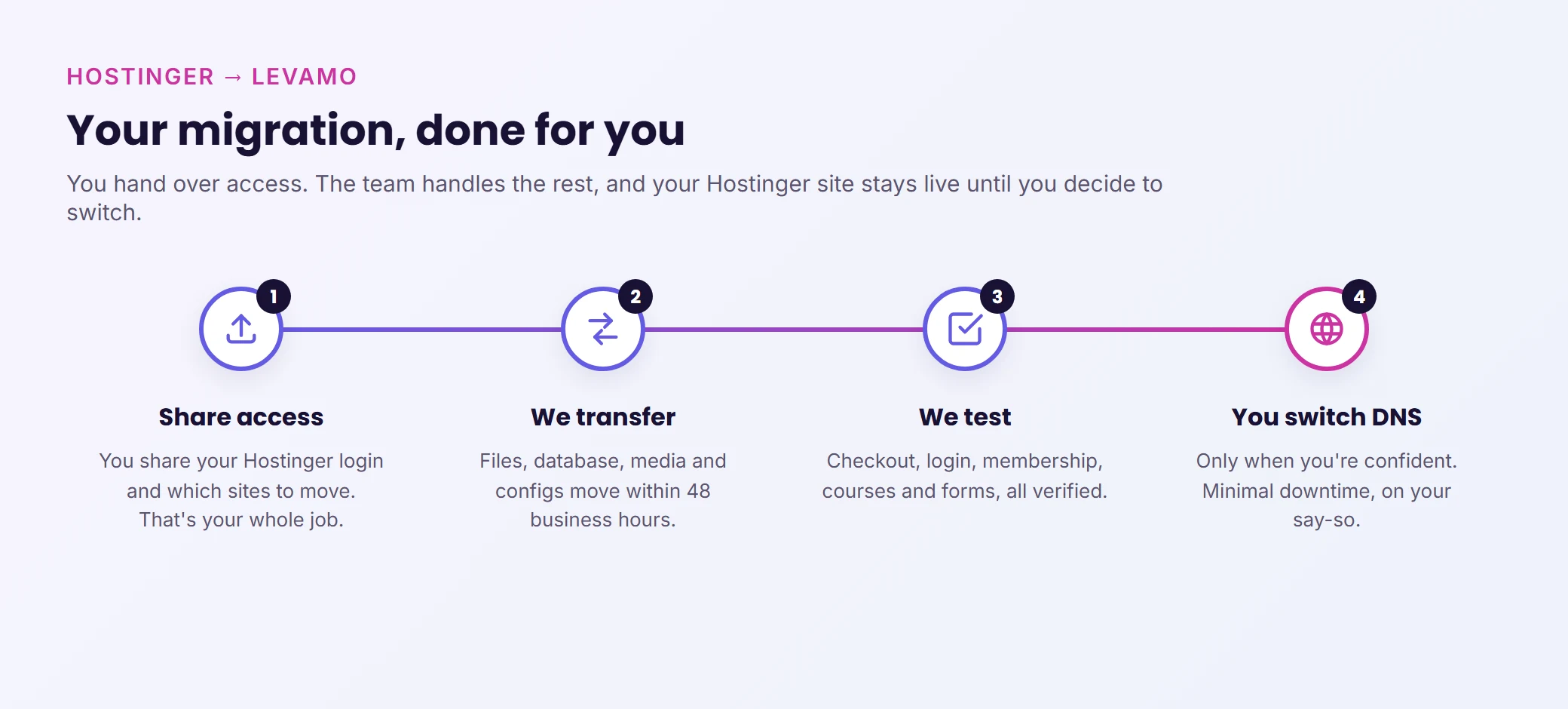
Your involvement: Share your Hostinger login credentials and tell us which sites to move. That's it.
What Levamo's migration team does:
- Copies your full WordPress installation (files, database, configurations, plugins, themes) to your new Levamo container.
- Tests every page, form, checkout flow, and integration on a staging environment before going live.
- Updates DNS records and handles SSL provisioning.
- Monitors your site for 48 hours post-migration to catch anything that needs adjustment.
What it costs: Nothing. Free white-glove migration on every plan, completed within 48 business hours with minimal downtime.
If you're running a complex stack (BuddyBoss + LearnDash + WooCommerce, or a multi-vendor marketplace), the migration team has moved hundreds of these configurations. They know which plugins need re-activation sequences, which caches need clearing, and which database tables need optimization after the move.
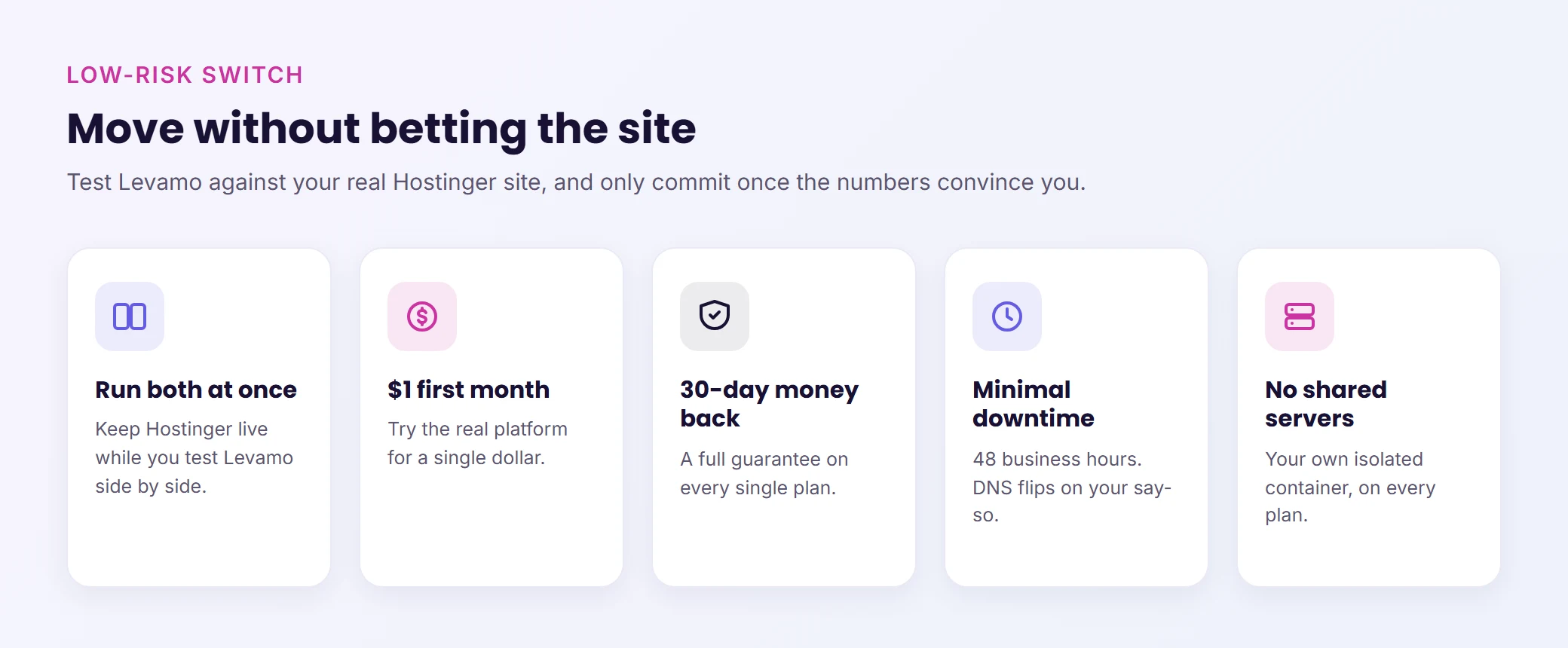
Start for $1 your first month. If the performance, support, or infrastructure doesn't meet your expectations, the 30-day money-back guarantee means you're not locked in.
Your site outgrew shared hosting. Your hosting should keep up. Start your free migration: $1 first month, a 30-day money-back guarantee, free white-glove migration, and 24/7 WordPress engineers.