The early days of the internet were straightforward: a web server would receive a page request, run a PHP script, and generate the HTML markup for the request. For years, everything ran smoothly - until it didn’t, as websites grew more complex.
Each individual page request used to trigger the PHP interpreter to start up, process the code, and shut down again. This was inefficient.
Enter the idea of 'workers' - persistent background processes that stay active, always ready to handle incoming requests.
And so, PHP workers were born, quickly becoming a vital component of modern web hosting.
What Are PHP Workers, Exactly?
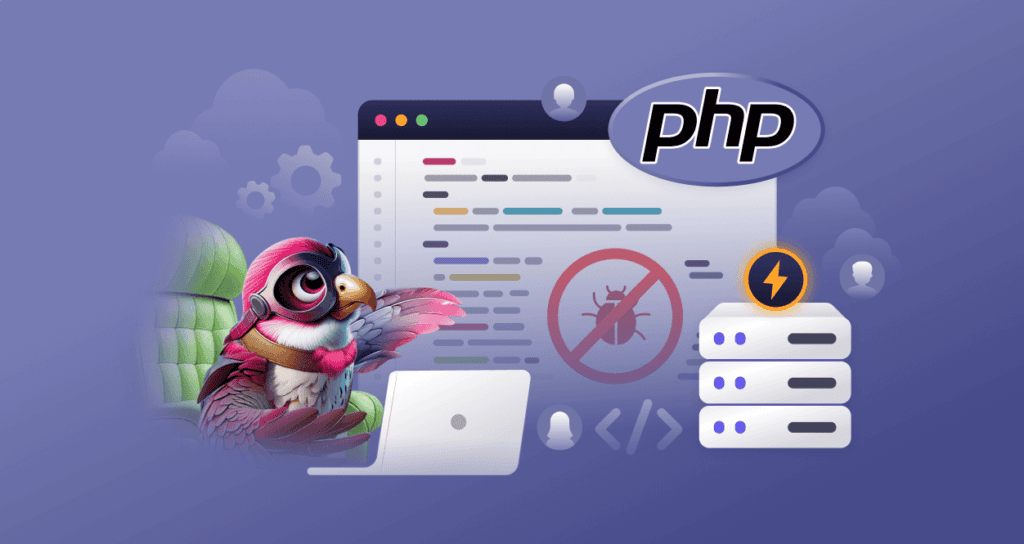
PHP workers are processes running on your web server that handle and process page requests made by visitors to your website. Whenever a user interacts with your site, whether by clicking a link, submitting a form, or performing any other action, PHP workers are responsible for executing the necessary PHP code and returning the right content to the user’s browser.
Want to watch a video instead?
https://www.youtube.com/watch?v=Hq977L70ElE
No? Okay, read on!
In simpler terms, think of PHP workers as the behind-the-scenes team that ensures your website functions as intended. They process each action on your site, making sure the right information is delivered at the right time, without delays. If your website has multiple visitors or complex functions, more PHP workers can be added to handle the load efficiently.
How Many PHP Workers Do You Need?
The number of PHP workers you need depends on several factors related to your website's traffic and complexity. These include:
-
Website Traffic: The more visitors your site has, the more PHP workers you’ll need to handle multiple simultaneous requests. For high-traffic websites, having more workers ensures that users don’t experience slow load times or timeouts.
-
Website Complexity: If your site is simple, with basic pages and minimal server-side processing, fewer PHP workers will fit the bill. But if your website is more dynamic, with complex databases, third-party integrations, or custom PHP scripts, you may need additional workers to handle those processes without a problem.
-
Hosting Environment: The hosting plan you use often determines how many PHP workers are available. Shared hosting plans typically offer fewer workers, while VPS (Virtual Private Server) or dedicated hosting plans provide more flexibility and resources.
-
Peak Traffic Times: If your site experiences sudden traffic spikes (for example, during promotions, product launches, or seasonal sales), you'll need extra PHP workers to handle the increased load. In such cases, scaling up the number of workers temporarily can prevent slowdowns.
-
Performance Goals: If you prioritize fast page loads and a smooth user experience, having enough PHP workers to process requests efficiently is crucial. If you notice slow page loads or errors related to server timeouts, you might need more workers to improve performance.
As such, the number of PHP workers you need depends on your website's traffic and complexity. For a small eCommerce store with low traffic, a few PHP workers may do the trick. As your customer base grows and more people browse products and complete purchases, you’ll need additional PHP workers to avoid delays and slowdowns.
Imagine a scenario where a large number of customers try to check out at the same time. Without sufficient PHP workers, some customers may experience slow load times or even timeouts.
But simply adding more PHP workers isn’t always the solution. If your server isn’t powerful enough, increasing the number of workers won’t help much.
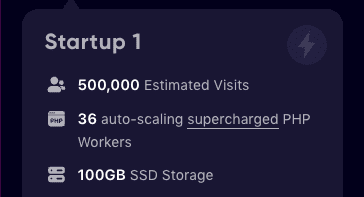
For example, Levamo's Startup Plan gives you 36 PHP workers, which are enough to handle 500,000 estimated visits.
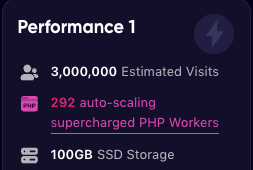
But as your website grows and your visitors and needs grow, you need more PHP workers to handle all the requests. That's why the Performance plan on Levamo has 292 auto-scaling PHP workers.
Think of it like an online store needing better infrastructure to handle more customers and transactions - your server will need an upgrade to efficiently support additional PHP workers. More RAM and CPU power will help your website manage more traffic, ensuring trouble-free performance during peak periods like seasonal sales or major shopping events.
Understanding PHP Worker Limits in Hosting Plans
So far, we know that PHP workers handle various tasks on your website: executing PHP code, managing background processes, running database queries, and generating pages. However, many managed hosting providers limit the number of PHP workers in their plans, only allowing more when you upgrade to a higher-tier plan.
The reason for these limitations is simple: restricting PHP workers helps manage server resources and prevents any single user from consuming too much of the server’s capacity. For hosting providers, limiting PHP workers also helps control operational costs, ensuring a balance between performance and expenses.
It’s important to note that Levamo automatically scales PHP workers based on your website’s traffic and server specs, ensuring optimal performance for you and other users without bottlenecks. When selecting a hosting provider, be sure to check how PHP workers are allocated and whether there are any limits in place.
How’s this for impact: PHP workers play a crucial role in processing website requests that do not hit the cache.
When a visitor accesses a WordPress website, the web server forwards the request to a process manager like PHP-FPM. It oversees a pool of waiting PHP background processes (the PHP workers) that enables WP sites to handle a greater volume of web traffic. PHP-FPM assigns a PHP worker to execute the necessary PHP code, process database queries, and generate the final HTML page.
The number of available PHP workers directly impacts website speed and responsiveness:
-
More PHP workers allow the server to handle multiple user requests simultaneously, reducing load times.
-
Too few PHP workers can cause delays as requests queue up, leading to performance issues.
Using a process manager like PHP-FPM, along with a well-optimized hosting environment, improves the response time of PHP environments, thus making websites faster and more scalable.
Quick note: LiteSpeed Web Servers have further developed this technology to bypass the need for a middleman process manager like PHP-FPM. Instead, they have created a native process management system inside the web server that communicates directly with its own fleet of workers (LSPHP workers).
Common Issues Caused by Insufficient PHP Workers
If a server lacks necessary PHP workers, it may struggle to handle multiple requests at the same time, causing several problems:
-
Slow Page Load Times: More traffic than available PHP workers can handle results in slower page loads and delays.
-
Timeouts and Errors: Requests may time out, causing errors or preventing actions like form submissions or checkouts.
-
Incomplete Page Loads: Not all elements may load properly, leaving pages incomplete or broken.
-
Website Crashes: Low PHP workers can overload the server, causing crashes and making the site inaccessible.
-
Difficulty Handling Traffic Spikes: High traffic events may lead to slowdowns or failures without an adequate number of workers.
-
Poor User Experience: Slow performance and errors frustrate visitors, leading to abandoned carts or lost sales.
-
Resource Bottlenecks: Insufficient workers can strain server resources like CPU and RAM, slowing overall performance.
-
Negative SEO impact: Poor performance negatively affects search engine rankings, as Google prioritizes fast-loading websites.
In short, not having enough PHP workers can harm your site's performance and user experience.
How to Optimize Your Site’s PHP Workers for WordPress
To optimize PHP workers for WordPress, the key is to ensure efficient request handling through object caching, reduce unnecessary plugins, and opt for a hosting provider with a high-performance CPU and proper PHP worker allocation.
We’ll break down each of these in detail:
1. Use Quality Plugins and Remove Unnecessary Ones
By quality, we mean a few things. First, always download them from authentic sources like the official WordPress plugin repository. Before installing, check the number of active installations and user reviews to see if the plugin effectively solves your problem, as reviews help determine reliability and performance.
Additionally, avoid plugins you likely don’t need or won’t use all that much. Ideally, you want to install only those that are indispensable for your site, since each plugin consumes memory and can affect performance. Having only useful plugins active results in better speed and stability of your website.
2. Use a Lightweight Theme
Achieving the optimal speed of your WordPress website considerably relies on the theme you use. A lightweight theme makes certain your site has faster loading times, better scores on tools like Google PageSpeed Insights, GT Metrix, and Pingdom Performance Analysis, and delivers an overall smoother user experience.
Plus, certain themes like Astra, GeneratePress, and Hello Elementor are specifically designed for speed and efficiency. They come with minimal bloat and integrate well with page builders like Elementor and Gutenberg. Also, you can create your own theme using any starter theme as a foundation, which consists only of the WordPress directory and essential files. This allows you to code the rest of your website freely - if you have the know-how.
So, going for a lightweight theme will do wonders for your site, from reducing unnecessary resource usage and improving responsiveness to maintaining high website performance without constantly upgrading hosting resources. And while we’re on the subject of hosting…
Most hosting companies are general-purpose providers. In other words, they aren’t optimized for any one platform, but overall good enough for anything you can throw at them. That’s perfectly fine in case you’re running a simple blog or online store, but for more demanding stuff, there is massive potential for optimization to get the most bang for your buck.
That said, here are the vital hardware specs to look for in a performance-optimized web host:
-
CPU: Responsible for the processing of code such as PHP (and much more, as it is the brain of the entire operating system). Generally, the more CPU/vCPU cores, the faster your site will be able to process and show pages to users.
-
RAM: The operating system, web server software (e.g., LiteSpeed), related programs (e.g., MariaDB), and other elements all need to fit inside your RAM capabilities to run properly. The more traffic (especially concurrent traffic) you get, the more RAM you need to keep the CPU fed with data for processing all those requests.
-
Storage: A good web host will provide fast SSD drives (particularly NVMe types) to fit all your website files and media, and with swap space to spare. When a server reaches peak traffic, it risks running out of RAM. That's when it really slows down and bad things happen system-wise if no swap space is available.
-
Networking: No matter how good hosting hardware is, it’s nothing without a fast network. Beyond offering great bandwidth rates, high-performance hosting often relies on CDN technology (where servers are distributed across the world) to serve visitors with the lowest possible latency.
Did we mention that Levamo's best managed WordPress hosting plans tick all these boxes?
That’s because we are bucking the trend of providing just good enough hosting services. Our new way? Putting speed first, no matter what.
Get the Most out of Your PHP Workers
As critical components go, PHP workers are right there at the OP. They enable apps to handle multiple requests simultaneously, improving speed and performance along the way. When you think about it, calling them ‘workers’ is a great analogy as they behave very much like dedicated employees who handle tasks.
One thing is for sure - without them, the internet would be a sadder place, and your site would be a lot worse for it.