Advanced SiteShield, our site security add-on powered by Patchstack, just received its biggest upgrade since launch. The limited summary view in your dashboard has been replaced with the full Patchstack security platform, embedded directly inside Levamo.
One quick note before we dive in: Advanced SiteShield is an optional add-on, so this update applies to sites that have it enabled. If that's you, everything below is already live in your dashboard at no extra cost. If not, you can add it to any site for $4 per month. More on that at the end.
Why We Made This Change
The feedback we heard from customers was consistent: you wanted more visibility and more data about what Advanced SiteShield is actually doing for your site.
The old Security view showed a handful of numbers: how many plugins or themes were vulnerable, how many were outdated, and a chart of threats blocked over the last 30 days. Useful at a glance, but thin. You couldn't see which vulnerabilities mattered most, or how the protection actually worked.
So instead of bolting on another chart or two, we went further. Advanced SiteShield now opens into the complete Patchstack security application, running live against your site, inside your Levamo dashboard.
Everything You Can See and Do Now
Click Open Advanced SiteShield from your site's Security tab and you land in a full three-part security center: Vulnerabilities, Packages, and Protection.
Vulnerability Intelligence, Not Just a Count
The old view told you how many components were vulnerable. The new one tells you what matters.
Every detected vulnerability comes with a priority level, and you can filter the feed to show only vulnerabilities that are actively exploited in the wild. That distinction is everything in WordPress security: most vulnerabilities are never weaponized, while a handful get attacked within hours of disclosure. Now you can see at a glance which category you're dealing with, search the full list, and sort by newest or by priority.
A Complete Inventory of Your Stack
The Packages tab lists everything running on your site: every plugin, every theme, WordPress core, your PHP version, and even your database. For each package you can see whether it's active, whether it has known vulnerabilities, the version you're on, and the version available.
Built-in views let you triage fast: Update now, Vulnerable, Mitigated, Threats blocked, Deactivated, and Advised to replace. That last one is worth highlighting, since it flags abandoned software that will never receive a fix, which no version number alone can tell you.
See the Protection Actually Working
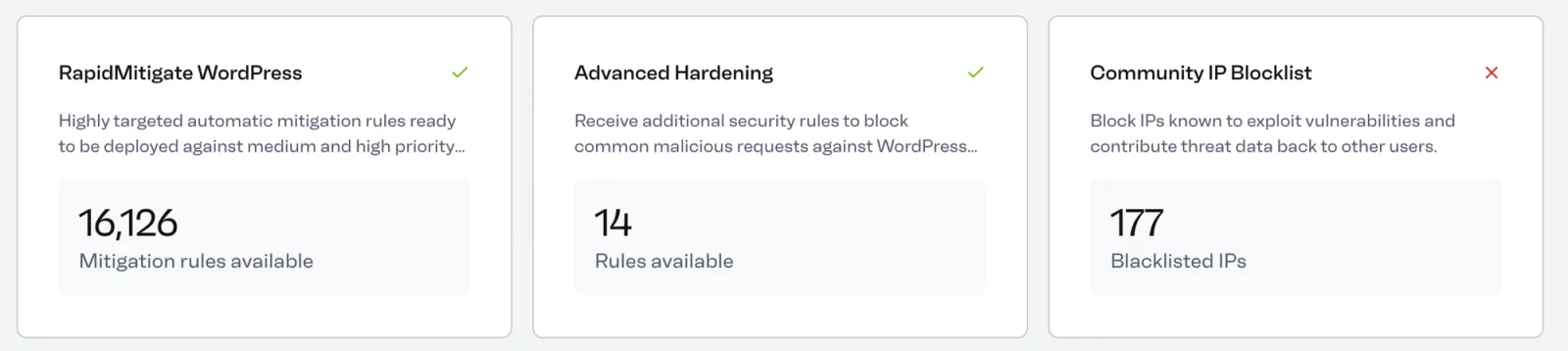
The Protection tab shows you the defense layers that used to be invisible:
- RapidMitigate virtual patching: over 16,000 targeted mitigation rules ready to deploy against medium and high priority vulnerabilities, blocking exploit attempts even before you've updated the affected plugin.
- Advanced hardening: additional rules that block common malicious requests against WordPress.
- Community IP blocklist: IPs known to exploit vulnerabilities across the Patchstack network are blocked on your site, and threat data flows back to protect everyone else. Every protected site makes the others safer.
You can also view threats blocked over 7 days, 1 month, 6 months, or all time, so the 30-day window is no longer the only lens you get.
Real Firewall Controls
For those who want hands-on control, it's all there now:
- Whitelist trusted traffic by IP address, payload, or URL
- Block IPs individually, by range, or by CIDR notation
- Tune auto-block behavior: how many failed attempts within what window trigger a ban, and how long it lasts
- Exempt specific user roles from the protection engine
- Review the live list of currently banned IP addresses
You don't have to touch any of it. Advanced SiteShield protects your site out of the box with sensible defaults, and our team still manages the platform for you. But when you want the controls, they're yours.
How to Open the New Dashboard
If Advanced SiteShield is enabled on your site, there's nothing to install or configure:
- Log in to your Levamo dashboard
- Open your site and go to the Security tab
- Click Open Advanced SiteShield
The full security center opens with your site's live data. Everything described above is included with the add-on you already have.
Don't Have Advanced SiteShield Yet?
As a reminder, Advanced SiteShield is an optional add-on, so if you haven't enabled it, the Security tab won't show the new dashboard yet. Adding it is simple: it's $4 per month, per site. Head to the Security tab of any site in your dashboard and you can add it to your plan from there.
For $4 a month you get continuous vulnerability monitoring of your entire stack, virtual patching backed by more than 16,000 mitigation rules, a managed firewall with community threat intelligence, and the complete security dashboard described above.
Site security is one of those things you hope you never need and are very glad to have when you do. With this upgrade, you no longer have to take our word for it. You can open the dashboard and watch it work.