What is BuddyNext?
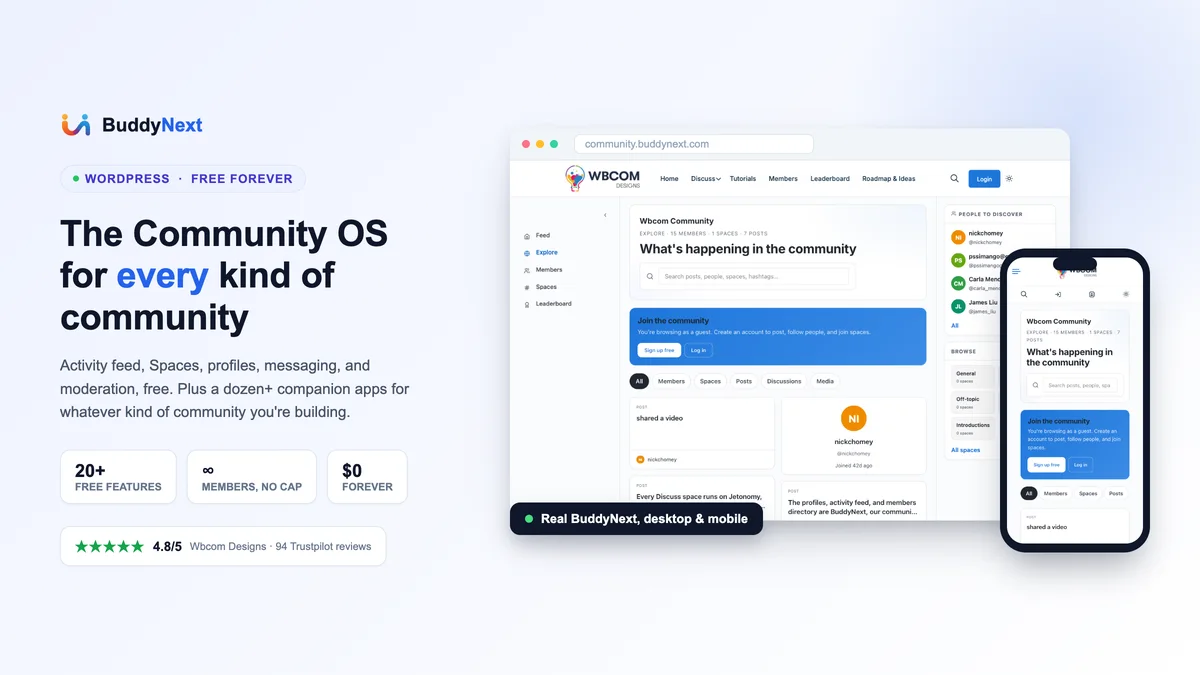
BuddyNext is a WordPress plugin that turns a site into a complete community platform: activity feed, member profiles, Spaces (their term for groups), a member directory, private messaging, and moderation tools, all wired together out of the box rather than assembled from separate add-ons.
It is not built on top of BuddyPress. It's a standalone plugin with its own architecture, which matters for performance, more on that in the setup section below.
But the core engine is only half the product. BuddyNext is built by Wbcom Designs, a team that already maintains a dozen-plus standalone WordPress plugins covering forums, LMS, media, job boards, directories, gamification, events, and marketplaces, and most of them plug into BuddyNext automatically when both are active (the exact integration depth varies by app, covered honestly below, not every one of these has a documented BuddyNext hook yet). That's the part that actually answers "what kind of community platform is this": not a social feed with some groups bolted on, but a hub that becomes whatever kind of community you point it at.
This is the section most community-plugin reviews skip, because most community plugins don't have an answer here. BuddyNext does, and it's worth walking through what each companion app actually turns your community into in real detail, because a list of app names means nothing on its own, the question is whether they map to real community types and what you actually get for free before you'd need to pay.
Course and membership communities: Learnomy
Learnomy is a full, free WordPress LMS, not a stripped trial of a paid one. The free tier includes unlimited courses with video, audio, PDF, and reading lessons, a six-question-type quiz engine (multiple choice, true/false, short answer, fill-in-the-blank, essay, with five more question types in Pro), anti-cheat tab-switch tracking, an essay-grading inbox, and Ed25519-signed certificates with a public verification page and QR codes. Checkout runs directly through Stripe and PayPal at zero platform fees, no percentage cut the way hosted course platforms like Teachable or Kajabi take.
The part that matters most for a community built around teaching is that Learnomy ships a real instructor marketplace. Teachers apply, get their own dashboard, and get paid automatically through Stripe Connect; therefore, a multi-instructor community (such as a cohort of coaches or a network of tutors) doesn't need a separate payout system bolted on. Pair it with BuddyNext, and your students get a real community profile and can join Spaces around a cohort or topic, while the actual teaching, grading, and course sales run through Learnomy underneath. That's the difference between "a community that happens to sell a course" and BuddyBoss's approach of needing a separate LearnDash license just to get here. Learnomy is newer to the market (distributed from the Wbcom store, not WordPress.org yet), but with 166 REST endpoints and a migration wizard from LearnDash, Tutor LMS, and LifterLMS, switching in isn't a rebuild from scratch. Pricing starts at $48/year once you need Pro's advanced quiz types, content drip, or cohort features, though the core teaching and certification stack is entirely free.
Support, product feedback, and Q&A communities: Jetonomy
Jetonomy is what turns BuddyNext from "a place people post updates" into "a place people go to actually get help or influence a roadmap." It's forums, accepted-answer Q&A, and an Ideas board with a Planned-to-Shipped workflow, all free, with custom database tables rather than bloating wp_posts the way CPT-based forum plugins do (their own benchmark claims 50,000 topics at roughly 200ms with Redis caching).
The mechanic that actually matters for community health at scale is Jetonomy's six trust levels (TL0 through TL5), with TL1 through TL3 auto-promoting based on genuine activity and TL2+ automatically exempt from anti-spam checks. This creates a self-moderating community: your most active, trusted members stop hitting friction meant for first-time visitors without you manually promoting anyone. TL4 and TL5 are manual, reserved for people you actually vet. Add voting, reputation, three-level threading, a Markdown composer, and built-in importers from bbPress, wpForo, and Asgaros (with URL preservation so old links don't 404), and you've got a genuine forum platform, not a comments section wearing a forum's clothes. The free version covers all of the above; Pro adds AI-assisted moderation, reactions, private messaging between forum members, and email digests.
WPMediaVerse is worth understanding as more than an optional add-on: BuddyNext's own messaging and media posting actually run through WPMediaVerse under the hood, so once your members start sharing more than text, this stops being optional and becomes closer to a core dependency.
Free gets you drag-drop photo and video upload, albums, collections, and gallery groups, reactions, threaded comments, follows, favorites, @mentions, an Instagram-style explore feed with a lightbox, and 1:1 direct messages that include voice messages and message requests. The feature that matters most for any community accepting user uploads at scale is automatic content moderation: every upload runs through OpenAI Vision using your own API key, so you're not manually reviewing a growing queue of user-generated photos and video by hand. Custom database tables mean "100,000 media items add zero rows to wp_posts," per their own benchmark claim, worth verifying at your own scale but directionally the right architecture choice. Pro adds five layout modes (including an Instagram-style stories bar), cloud storage via S3 or BunnyCDN, video transcoding, and a gamification suite (photo challenges, battles, tournaments) that ties directly into WB Gamification, covered below.
Professional, alumni, and industry communities: WP Career Board
WP Career Board turns BuddyNext into a job board your members actually use rather than a static "careers" page nobody checks. Free includes job listings with real filtering (keyword, category, location radius, salary band, remote-only), saved searches with daily email alerts, apply-with-profile or CV upload with screening questions, a full resume database and builder (it can run as a standalone resume board on its own), company profiles with follow and new-job alerts, and JobPosting schema markup on every listing, meaning your jobs are eligible to show up in Google's dedicated Jobs search results, not just regular organic search.
For an alumni network, a professional association, or an industry-specific community, this is frequently the single feature that makes membership worth paying for, a curated, trusted job board beats a generic one because the pool posting and applying is already vetted by community membership. It's block-first (14 blocks, Gutenberg-native, no shortcodes or jQuery), and ships migrators from WP Job Manager, JobBoardWP, Simple Job Board, and WP Job Openings if you're consolidating from an existing setup. Pro adds a Kanban-style application pipeline, credit-based paid job posting plans, and AI candidate matching.
Local, niche, and business-directory communities: Listora
Listora adds 10 listing types out of the box, business, restaurant, real estate, hotel, job, event, classified, healthcare, education, and place, which covers most of what a local or niche-vertical community actually needs without stacking separate directory add-ons. Free includes multi-step frontend submission with a review queue, business claims, five-star reviews with owner replies and helpful votes, full-text search with distance/rating/amenity filters, and mapping through OpenStreetMap, deliberately, so there's no API key requirement and no per-view charges the way Google Maps-based directory plugins eventually cost you at scale.
A neighborhood community, a niche marketplace of local service providers, or an events-and-venues-focused community all lean on Listora rather than the plain activity feed for their actual core content. It's built block-first on the Interactivity API with no jQuery, includes six layers of anti-spam protection, CSV and GeoJSON import/export, and migrators from Business Directory Plugin, Directorist, GeoDirectory, and ListingPro. Pro adds the monetization layer: credit-based paid listing plans, Google Maps and Places autocomplete, per-listing analytics, and a "Needs Marketplace" mode where visitors post what they're looking for and businesses respond to it, a reverse-directory model most competitors don't have at all.
Marketplaces where members sell to each other: WP Sell Services
WP Sell Services is a standalone Fiverr-and-Upwork-style service marketplace: vendors list tiered packages for buyers to browse and purchase directly, or buyers post a project brief and collect proposals instead, both modes ship free and can run side by side. An 11-status order lifecycle handles requirements collection, delivery, revisions, and dispute resolution, the actual mechanics a service sale needs that a standard product page was never built for.
Worth being precise here since it's easy to mischaracterize: this does not require WooCommerce. It ships its own standalone Stripe, PayPal, and offline checkout, confirmed directly from the product's own FAQ. WooCommerce integration exists but only as an optional Pro feature for stores that specifically want its 100+ payment gateway options, not as a dependency. That means a freelancer collective, a consultant network, or a coaching community can run an entire service marketplace inside BuddyNext without a separate storefront plugin underneath it. Free covers both marketplace modes, the full order lifecycle, and standalone checkout; Pro starts at $48/year and adds WooCommerce as an optional checkout path, vendor analytics, and automated payouts.
Events, meetups, and RSVP-driven communities: Eventonomy
Eventonomy is worth flagging here with one honest caveat up front: unlike the six apps above, it is not currently a documented BuddyNext integration, neither product's page mentions the other. It's a separate free Wbcom product, not officially part of BuddyNext's companion-app roster yet. Given how directly relevant it is to community management, it's worth knowing about regardless, and it wouldn't be a surprise if that integration gets documented later given the pattern with the rest of the ecosystem.
On its own merits: Eventonomy is a genuinely complete free events platform, unlimited events and RSVPs, RSVP states of going/maybe/no with guest counts, capacity caps with automatic waitlisting, four calendar views, recurring events, an ICS calendar feed, guest RSVP without requiring an account, and magic links so attendees can manage their own RSVP without logging in. A community built around recurring meetups, a conference, or a series of workshops could run entirely on Eventonomy today, just managed as a parallel system to BuddyNext rather than a wired-in one. Pro adds paid ticketing through Stripe, PayPal, Square, or Mollie, a door check-in scanner, and SMS reminders via Twilio.
The engagement layer across all of the above: WB Gamification
WB Gamification is the piece that ties everything above together, and the detail worth leading with: it is 100% free forever, GPLv2, unlimited sites, every feature included, no paid tier exists.
It's a real engine, not a badge sticker: an event-sourced points ledger built on Action Scheduler (their own benchmark claims sub-100ms at 100,000+ members), multi-currency points, 30 pre-built badges plus unlimited custom ones with OpenBadges 3.0 verifiable credentials, auto-promoting levels, leaderboards scoped daily through all-time, cohort leagues (a Duolingo-style weekly Bronze-to-Diamond tier system), streaks with a GitHub-style contribution heatmap, peer-to-peer kudos, community-wide shared-progress challenges, and a redemption store that can auto-generate WooCommerce coupons. It already has a documented integration with Jetonomy specifically, reputation mirrors 1:1 into the points ledger, so your forum's most helpful answerers get recognized with real points automatically, not just a badge on their profile. A documented integration with WPMediaVerse Pro also exists (17 actions covering uploads, photo battles, and upload streaks). For any community built on the apps above, whichever one you pick, WB Gamification is close to a no-downside add, it's free, it's built to layer on top, and it's the difference between a community that's technically functional and one that gives members a reason to come back tomorrow.
Beyond the seven above, the roster rounds out with WB Polls (activity polls plus standalone surveys with analytics, one license, no per-response fees), WB Member Blog (front-end member blogging using plain WordPress posts, no custom tables, so content stays portable), WB Ad Manager (an ad rotator, affiliate link cloaker, and classifieds board consolidated into one plugin, useful for a community that wants to monetize inventory without stacking three separate tools), MediaShield (one video player with real protection and watch analytics, aimed at communities selling paid course or coaching video content), SnipShare (a self-hosted Pastebin or Gist alternative, built for developer and technical communities that need to share and discuss code snippets natively), and WB Member Wiki (a lightweight in-WordPress wiki for communities that need shared, collaboratively-edited documentation, an internal knowledge base or a fan wiki, without standing up MediaWiki separately). None of these are the app that defines a community on their own the way Learnomy or Jetonomy are, but each solves one specific, real problem that would otherwise mean installing a completely unrelated third-party plugin.
| Building this kind of community |
Add this app |
What is genuinely free |
| Courses, coaching, cohorts |
Learnomy |
Unlimited courses, 6 quiz types, certificates, 0%-fee checkout |
| Support, Q&A, product feedback |
Jetonomy |
Forums, Q&A, Ideas board, 6 trust levels, importers |
| Photo/video, visual-first |
WPMediaVerse |
Uploads, albums, explore feed, AI auto-moderation |
| Alumni, professional, hiring |
WP Career Board |
Listings, resume DB, Google Jobs schema |
| Local, niche, business directory |
Listora |
10 listing types, reviews, free OpenStreetMap maps |
| Freelance or service marketplace |
WP Sell Services |
Both marketplace modes, full order lifecycle |
| Meetups, conferences, RSVPs |
Eventonomy |
Unlimited events/RSVPs, waitlists, recurring events |
| Engagement layer, any of the above |
WB Gamification |
Everything, no paid tier exists |
The honest way to evaluate this: don't install everything on this list. Pick BuddyNext for the core identity and moderation layer, then add the one or two companion apps that actually match what your community actually is: a course community needs Learnomy, not Listora. That's the model: purpose-built pieces you assemble, not a monolith you configure.
Should You Choose BuddyNext?
BuddyNext is newer than BuddyPress or BuddyBoss, it's currently at version 0.6, so it doesn't have a decade of plugin-directory history behind it. What it does have is a complete free tier: activity feed, Spaces, profiles, messaging, member directory, and moderation are not gated behind a paywall the way some competing plugins gate group messaging or advanced privacy controls.
It's worth being upfront about one thing: BuddyNext isn't distributed through the WordPress.org plugin directory, so you install it from a downloaded zip file rather than searching for it in your WordPress admin. That's a minor extra step, and it's the same distribution model PeepSo itself uses.
If you want a modern, actively developed community platform that adapts to a specific community type instead of forcing a one-size-fits-all social feed, BuddyNext is a strong candidate, especially if you already know you need a course, forum, media, job-board, directory, or marketplace layer and would rather get a purpose-built free tool than a paid add-on bolted onto a generic base. If you specifically need the years-long track record and largest existing third-party plugin ecosystem, BuddyPress or BuddyBoss (with its LearnDash-first maturity) are still the safer, more battle-tested choices today, though neither matches the breadth of purpose-built companion apps BuddyNext ships with from a single vendor.
Core Features of BuddyNext
BuddyNext's free tier is built around six pillars: activity, spaces, profiles, discovery, messaging, and moderation. Here's what's actually included, no paywall:
- Activity feed with four views (For You, Following, Spaces, Network), six reactions, five-level threaded comments, reposts, and quotes.
- Spaces with three visibility levels, open (anyone can join), private (request to join), and secret (invite-only), each with its own feed, roles, and per-space moderation.
- Rich member profiles with 13 field types, per-field privacy controls, and a profile-completion meter.
- A searchable, filterable member directory plus an Explore feed for trending posts and suggested members.
- One-to-one private messaging with photo and file sharing (group messaging and real-time delivery are Pro).
- Deep moderation: reports, strikes, suspensions, shadow-bans, banned words/hashtags/domains/IPs, and auto-hide thresholds, all usable without upgrading.
- A 4-step guided member onboarding wizard with reminder emails, so new signups don't stall out on an empty profile.
This is the identity and moderation layer every community needs regardless of type, the companion apps above are what turn it into a specific kind of community.
Pros and Cons of BuddyNext
Pros (The Good):
- Genuinely complete free tier: Activity feed, Spaces, messaging, profiles, and moderation all ship free, not a stripped demo of the paid version.
- Purpose-built for the actual community type, not just "social": Course communities get a real LMS, job communities get a real job board, media communities get real upload/moderation tooling, instead of every community type getting the same generic activity feed.
- Not built on BuddyPress: A standalone architecture means it isn't inheriting fifteen years of BuddyPress's accumulated database structure, which shows up as real performance headroom at scale.
- One vendor, mostly one integration story: Most companion apps come from the same team and are documented to integrate with BuddyNext, versus stitching together plugins from five different vendors that were never designed to talk to each other. (Not universal, Eventonomy is the current exception, covered honestly above.)
- Modern moderation out of the box: Shadow-bans, banned-word lists, and auto-hide thresholds are usually Pro-tier or third-party-plugin territory elsewhere; here they're free.
- A genuinely free-forever engagement layer: WB Gamification has no paid tier at all, unusual in a market where GamiPress and myCred charge per integration.
Cons (The Limitations):
- Young platform: At version 0.6, BuddyNext doesn't have the multi-year public track record that BuddyPress and BuddyBoss have. Early adopters get faster iteration; risk-averse teams may want to watch it mature a bit longer.
- Ecosystem breadth means more decisions upfront: More than a dozen companion apps is a genuine strength, but it also means a new site owner has to actually figure out which ones apply, there's no single "turn on everything" button, and shouldn't be one.
- Integration depth isn't uniform across the ecosystem: Jetonomy, WPMediaVerse, and WB Gamification have clearly documented BuddyNext ties; some of the smaller apps (WB Polls, WB Member Blog, WB Ad Manager, SnipShare, WB Member Wiki, MediaShield) are positioned as part of the family without the same level of documented, hook-level integration specifics, and Eventonomy currently has none at all. Worth confirming current integration depth for any specific app before assuming it's wired in.
- Not on WordPress.org: Distributed from the Wbcom Designs store instead, so it's a manual zip install rather than a plugin-directory search. Functionally identical once installed, just an extra step. The same is true for every companion app covered above.
- Real-time features are Pro-only: Group messaging and live delivery (typing indicators, presence, WebSocket push) require the paid tier, free messaging is one-to-one only.
Setting up BuddyNext follows a familiar WordPress pattern, with one extra step since it isn't in the WordPress.org directory:
- Download the plugin: Visit wbcomdesigns.com/downloads/buddynext and download the free zip file, no account or license key required for the free tier.
- Install and activate: In your WordPress admin, go to Plugins → Add New → Upload Plugin, select the downloaded zip, install, then activate.
- Run the onboarding wizard: BuddyNext's 4-step setup wizard walks you through the basics, profile field selection, initial Spaces, and notification defaults, so you're not configuring everything from a blank settings screen.
- Decide what kind of community this actually is, before installing companion apps: This is the step most guides skip. Don't install Learnomy, Jetonomy, WPMediaVerse, WP Career Board, Listora, and WP Sell Services all at once. Use the reference table above, pick the one or two that match what you're actually building, add the LMS if you're teaching, add the forum if you're supporting, add the media app if you're visual-first, and leave the rest for later. Each is a separate free download from its own product page.
- Create your first Spaces: Set up two or three focused Spaces rather than one catch-all group. A dedicated, focused Space (say, an announcements-only one and a general-discussion one) gives new members an obvious first move.
- Configure moderation before you open signups: Set your banned-word list and auto-hide thresholds before members arrive, not after the first spam wave. It's a five-minute step that saves a much longer cleanup later.
- Add WB Gamification once your core community app is live: Since it's free with no tier to weigh, there's little reason not to layer it in early, points and a leaderboard give your first cohort a reason to stay active while the community is still thin.
- Invite your first members: BuddyNext's member onboarding wizard sends reminder emails to profiles that stall out incomplete, worth leaving on for your first cohort so early members actually finish setting up their profiles.
BuddyNext Pricing Plans
BuddyNext's free plugin is a genuinely complete community platform, not a time-limited trial. Pro adds monetization, AI features, real-time messaging, and analytics on top of the same free foundation. Worth noting: the companion apps covered above are separate Wbcom products with their own free tiers and their own optional Pro upgrades, they are not included in a BuddyNext Pro license, so pricing out a full community stack means checking each app you actually plan to use:
- Free - $0 forever. Unlimited members, full activity feed, Spaces, profiles, messaging, member directory, and moderation.
- Personal - $149/year (or $399 one-time for a lifetime license), 1 site. Adds Stripe membership tiers, gated Spaces, AI feed ranking and moderation, WebSocket real-time messaging, and analytics.
- Professional - $249/year (or $599 lifetime), 5 sites. Same Pro feature set as Personal, licensed across five communities.
- Agency - $399/year (or $999 lifetime), unlimited sites plus white-label. Built for agencies managing community sites for multiple clients.
Every Pro tier unlocks the identical feature set, the only difference between tiers is how many sites the license covers, and features already available in a given release never move behind a higher tier later.
For a realistic full-stack example: a course-and-support community can run BuddyNext Free plus Learnomy Pro plus Jetonomy Pro plus WB Gamification, and still land well under the annual cost of a hosted all-in-one platform, before BuddyNext's own Pro tier is even in the picture. Most companion apps follow the same shape as Jetonomy: a genuinely usable free tier, with Pro priced separately in the $48 to $104 per year range (WP Career Board, WPMediaVerse, Listora, and WP Sell Services all fall in this band), while WB Gamification has no paid tier at all.
Why Choose Levamo with BuddyNext?
This is where hosting stops being an afterthought. A community platform is one of the most demanding things you can run on WordPress: every page view is a logged-in, personalized query, an activity feed, a member's own notifications, a Space they belong to, none of it is a static page a cache can just serve back unchanged.
And BuddyNext's ecosystem model makes this compound rather than stay flat. A community running Learnomy adds quiz submissions and video lesson delivery. One running WPMediaVerse adds photo/video upload processing and an AI moderation API call on every image. One running Jetonomy adds full-text search across tens of thousands of forum posts. One running Eventonomy or WP Career Board adds its own scheduled-query and search-filter load. Each companion app is its own additional dynamic workload stacked on top of the core feed, this isn't a plugin that gets heavier only if you let it, the whole model is designed around adding exactly the load your specific community needs, which means the hosting underneath needs to handle whatever combination you actually assemble.
Levamo's infrastructure was built by a team that ran BuddyBoss hosting at scale, so this isn't a generic "any host will do" recommendation:
- Scalability: Container-isolated environments and auto-scaling PHP workers handle community growth, including sudden spikes after a successful invite push or launch campaign, without a manual upgrade scramble.
- Speed: LiteSpeed servers, auto-scaling PHP workers, KeyDB + Redis object caching, and Enterprise Cloudflare CDN across 300+ locations (included on every plan, not a paid add-on) keep activity feeds, course pages, forum search, and media uploads loading fast even as post, student, and member counts climb together.
- Security: Cloudflare WAF and DDoS protection, server-level Monarx malware scanning, free SSL, and authenticator-app 2FA matter more for a community site than a brochure site, you have real user accounts, uploaded media, and in some cases payment data across multiple apps to protect.
- Reliability: A community that goes down during its own growth spurt loses the members it just worked hardest to attract. Levamo's 24/7/365 support with sub-minute live chat response means you're not filing a ticket and waiting when your community is down at 2 AM.
A BuddyNext community running two or three companion apps is exactly the kind of dynamic, multi-workload WordPress site that separates hosts that merely serve pages from hosts built for real traffic.
Conclusion
BuddyNext is a serious, modern option for anyone evaluating WordPress community platforms in 2026, and the honest differentiator isn't the activity feed, every community plugin has one of those. It's that BuddyNext doesn't force every community into the same shape. A course community, a job-board community, a support community, a directory-driven community, and a photo-sharing community are structurally different things, and BuddyNext is the rare platform built by a team that seems to have actually accepted that, rather than shipping one feature set and calling it universal.
The free tier is complete enough to launch a real community on by itself. The companion apps, most of them free at the core too, are what make it worth evaluating seriously against BuddyBoss, Circle, or Mighty Networks: pick the one or two that match what you're actually building from the reference table above, and you get a purpose-built tool for that specific job instead of a generic one stretched to fit.
Pair it with hosting built for dynamic, multi-workload WordPress sites, like Levamo, and you've got the performance headroom to match the platform's ambition.