You want to sell courses, build a community, or run a membership. Two names keep showing up in every "best platform" list: MemberPress and Kajabi.
On the surface, they look like they solve the same problem. Both let you create memberships, deliver courses, accept payments, and manage subscribers. But the way they do it, what they cost, and who actually owns the business you build on them are fundamentally different.
Kajabi is a fully hosted, all-in-one platform. You sign up, pay monthly, and everything lives on Kajabi's servers. MemberPress is a WordPress plugin. You install it on your own WordPress site, host it wherever you want, and own every piece of data your business generates.
That distinction matters more than most comparison articles let on. Let's break it down.
MemberPress vs Kajabi at a Glance
Here's how the two platforms compare across the factors that matter most.
| Feature |
MemberPress |
Kajabi |
| Model |
Self-hosted WordPress plugin |
Fully hosted, all-in-one SaaS |
| Ownership |
You own your data, content, and site |
Everything lives on Kajabi's servers |
| Courses / LMS |
9 quiz types, graded assignments, gradebook, certificates |
Clean course builder, basic quizzes |
| Coaching |
CoachKit: full coaching management system |
Secondary feature, no dedicated tooling |
| Email |
Integrates ActiveCampaign, ConvertKit, Mailchimp |
Built-in email marketing |
| Pricing |
From $199.50/yr + your hosting |
From $179/mo ($2,388/yr on Growth) |
What Is MemberPress?
MemberPress is a WordPress membership plugin that's been around since 2012. It handles memberships, courses (with a built-in LMS called MemberPress Courses), coaching programs through CoachKit, and community features through ClubSuite.
Because it runs on WordPress, you get the full WordPress ecosystem at your disposal: thousands of themes, plugins for email marketing, CRM, e-commerce, analytics, and pretty much anything else you can think of. Your content, your subscriber list, your payment data, all of it sits in your own database on your own server.
MemberPress currently holds a 4.8 out of 5 rating on Trustpilot, with users consistently praising its feature depth and responsive support.
What Is Kajabi?
Kajabi is a hosted SaaS platform built for course creators and coaches. It bundles website building, course delivery, email marketing, payments, and basic community tools into a single monthly subscription.
The appeal is simplicity. You don't need to think about hosting, plugins, or server management. Kajabi handles all of that. The tradeoff is that everything, your courses, your subscriber list, your content, lives on Kajabi's infrastructure under Kajabi's terms.
Kajabi sits at 3.5 out of 5 on Trustpilot. Common complaints center on support delays, recent price increases, and the growing reliance on AI-generated support responses.
Pricing: How the Numbers Actually Stack Up
This is where the conversation gets interesting.
Kajabi pricing (2026):
- Basic: $179/month
- Growth: $249/month ($199/month with annual billing)
- Pro: $399/month
That Growth plan, the one most serious creators land on, comes out to roughly $2,388 per year on annual billing. And if you want a branded mobile app, add another $199/month.
MemberPress pricing (2026 introductory rates):
- Launch: $199.50/year
- Growth: $349.50/year
- Scale: $499.50/year
Even on the top-tier Scale plan, MemberPress costs $499.50 per year. That's roughly one fifth of what Kajabi Growth costs annually.
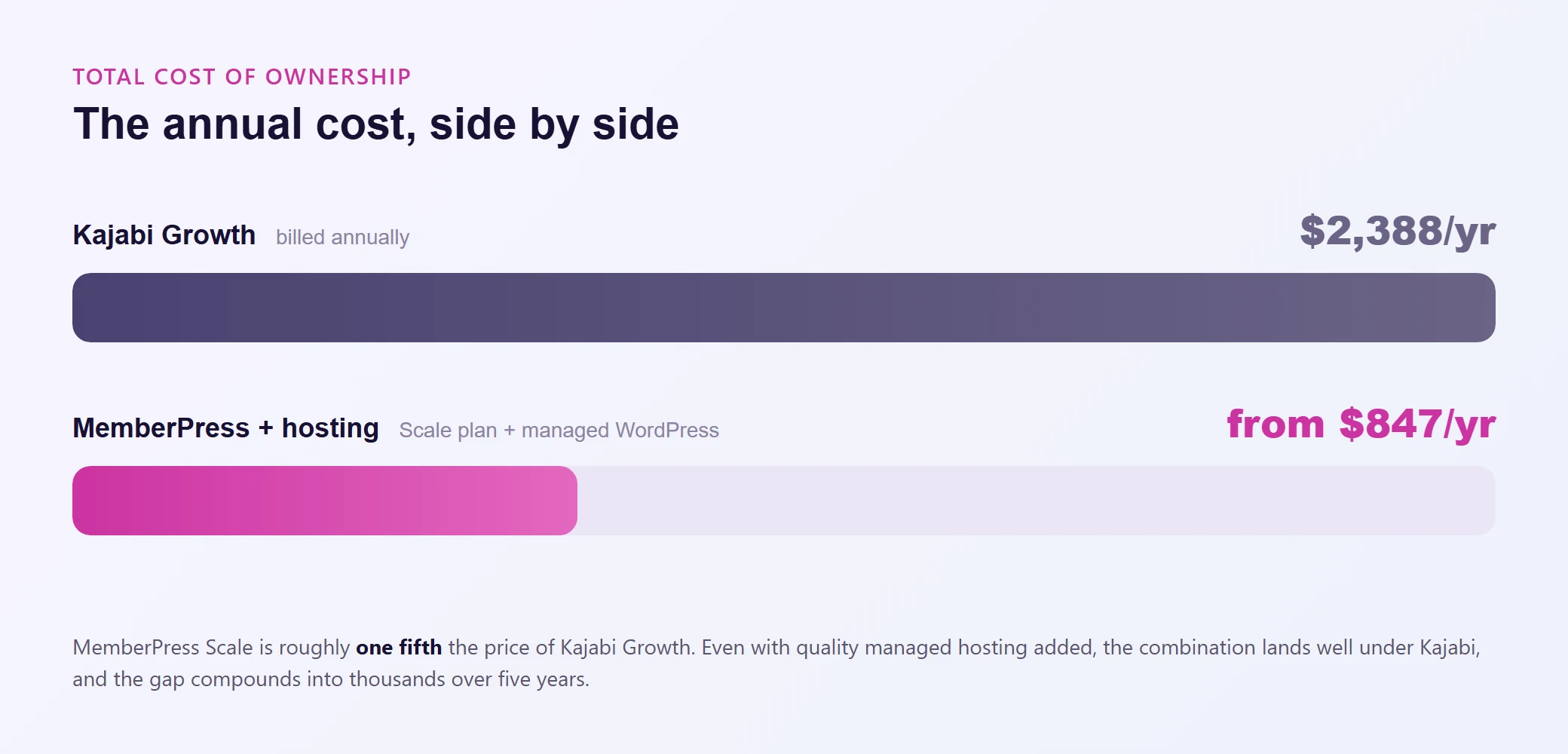
Now, MemberPress requires WordPress hosting, which adds cost. But even on a high-performance managed WordPress host, you're looking at $29 to $99 per month depending on your traffic and resource needs. Add that up: MemberPress Scale ($499.50/year) plus quality managed hosting ($348 to $1,188/year) still comes in well under Kajabi's $2,388/year.
Over five years, the savings compound into thousands of dollars. Money you could reinvest into content, marketing, or better tooling for your members.
Course and LMS Features
Both platforms let you build and sell online courses. The difference is depth.
Kajabi offers a clean course builder with video hosting, basic quizzes, and drip scheduling. It works well for straightforward courses. You upload your videos, structure your modules, and Kajabi handles delivery. For most simple courses, this is perfectly adequate.
MemberPress Courses goes deeper. You get:
- Drip content scheduling with flexible rules
- Nine quiz types (not just multiple choice)
- Graded assignments with instructor feedback
- A full gradebook for tracking student progress
- Completion certificates
- An AI course generator that helps you outline and build courses faster
If you're running a professional certification program, a multi-instructor academy, or anything where assessment and progress tracking actually matter, MemberPress gives you significantly more to work with.
Community features have become a deciding factor for many creators, and this is where the two platforms have diverged sharply.
Kajabi added community features, but they're relatively basic. You get discussion boards and group spaces. No native coaching management, no milestone tracking, no private messaging between coaches and clients.
MemberPress has invested heavily here with two dedicated tools:
ClubSuite gives you forums, member directories, private sub-groups, and activity feeds. Unlike Kajabi's community (or Skool's, for that matter), you're not limited to a handful of categories. You can create as many sub-groups as your community needs.
CoachKit is a full coaching management system:
- Unlimited coaching programs
- Milestone and habit tracking per client
- Automated client onboarding workflows
- Built-in scheduling (integrates with Calendly and Simply Schedule Appointments)
- Real-time coach-client messaging (on the Scale plan)
If coaching is part of your business model, this comparison isn't close. MemberPress built purpose-specific tooling for it. Kajabi treats coaching as a secondary feature.
Ownership and Data Control
This is the part that doesn't show up in feature comparison tables but might be the most important factor in your decision.
With Kajabi, your courses, your client list, your coaching content, your email sequences, your entire business, lives on Kajabi's servers. You're operating under their terms of service, their pricing decisions, and their platform roadmap. If Kajabi raises prices (which they did in late 2025 for the first time since 2015), you either pay more or face the pain of migrating everything out.
With MemberPress on WordPress, everything is yours. Your subscriber database, your course content, your payment records, your community data. It all lives in your own WordPress database, on your own server, under your own domain. If you ever want to change hosting providers, switch themes, or add entirely new functionality, you can. Nobody's permission is required.
This isn't a theoretical concern. Platform dependency is a real business risk. When your revenue depends on a platform you don't control, you're one terms-of-service update or price hike away from a very bad quarter.
Email Marketing and Integrations
Kajabi includes native email marketing. You can build sequences, send broadcasts, and segment your list without leaving the platform. For creators who want everything under one roof, this is genuinely convenient.
MemberPress doesn't include its own email marketing tool. Instead, it integrates with dedicated platforms: ActiveCampaign, ConvertKit, Mailchimp, Drip, and others. You'll need a separate email service.
Is this a disadvantage? It depends on how you look at it. Kajabi's built-in email is "good enough" for basic sequences. But dedicated email platforms offer deeper segmentation, better deliverability tracking, more sophisticated automation, and they don't lock your subscriber list behind a platform subscription.
If email is a critical revenue driver for your business (and for most membership sites, it is), a dedicated tool will outperform a bundled one.
Here's a dimension most MemberPress vs Kajabi comparisons completely ignore.
With Kajabi, performance is whatever Kajabi gives you. You can't upgrade your server, tune your database, or add a CDN. If your course platform feels sluggish under load, your options are limited to "contact support and hope."
With MemberPress on WordPress, your site's speed, uptime, and scalability depend on your hosting. This is both a responsibility and an opportunity. On cheap shared hosting, WordPress can feel slow. On purpose-built managed hosting, it can be blazing fast.
A membership site is a dynamic, logged-in workload. Every page load hits the database. Every course progress check, every community interaction, every payment verification requires server-side processing. Generic hosting struggles with this. Hosting built for dynamic WordPress workloads, with object caching, fast databases, and auto-scaling PHP workers, handles it effortlessly.
This is worth factoring into your total cost of ownership. The combination of MemberPress plus quality hosting isn't just cheaper than Kajabi. It can also be significantly faster, because you're choosing infrastructure optimized for exactly how membership sites work.
For a deeper look at what to prioritize in hosting for MemberPress specifically, check out our MemberPress hosting guide
Who Should Choose Which?
It comes down to how much you value ownership and feature depth versus all-in-one simplicity.
| Choose MemberPress if you... |
Choose Kajabi if you... |
| Want full ownership of your business, data, and content |
Want maximum simplicity with zero technical setup |
| Need advanced LMS features (graded assignments, certifications, gradebook) |
Need built-in email marketing and don't want to manage a separate tool |
| Run coaching programs and need dedicated management tools |
Are validating a new business idea quickly and prioritize speed over flexibility |
| Already use WordPress or plan to |
Prefer a single monthly bill over managing multiple services |
| Care about long-term cost efficiency |
Don't mind platform dependency and are comfortable with Kajabi's pricing trajectory |
| Want the flexibility to integrate best-in-class tools for email, CRM, and analytics |
|
| Are building a business you intend to own for years, not rent month to month |
|
Wrapping Up
MemberPress and Kajabi solve the same core problem from opposite directions. Kajabi bundles everything together and charges a premium for the convenience. MemberPress gives you deeper features, full ownership, and dramatically lower costs, in exchange for a bit more setup and the responsibility of choosing your own hosting.
For creators and membership site owners who think in terms of years, not months, MemberPress on WordPress is the stronger foundation. You keep more revenue, own all your data, and never worry about a platform pulling the rug out from under your business.
The hosting piece is what ties it all together. A membership site with hundreds or thousands of logged-in users needs infrastructure that can keep up. Choose hosting that's built for dynamic WordPress workloads, and you get the best of both worlds: the flexibility of MemberPress with the performance your members expect.
If you want to see how that feels in practice, try building your membership on hosting that was designed for exactly this kind of site.