Skool is everywhere right now. Alex Hormozi's involvement, a wave of creator endorsements, and a dead-simple interface have pushed it into just about every "best community platform" conversation. If you've been researching where to build your membership or community, you've probably seen it recommended dozens of times.
MemberPress, on the other hand, has been a go-to WordPress membership plugin since 2012. It doesn't have the same influencer buzz, but it has something Skool doesn't: a feature set that keeps growing without locking you into someone else's platform.
So which one actually deserves your money and your members? That depends on what you're building, how much control you want, and whether you're thinking in months or years. Let's break it down.
MemberPress vs Skool at a Glance
Here's how the two platforms compare across the factors that matter most.
| Feature |
MemberPress |
Skool |
| Model |
Self-hosted WordPress plugin |
Fully hosted community SaaS |
| Ownership |
You own your data, content, and site |
Everything lives on Skool's servers |
| Community |
ClubSuite: unlimited forums, sub-groups, and tiers |
One activity feed, up to 10 categories |
| Courses / LMS |
9 quiz types, assignments, certificates, gradebook |
Modules and videos, no quizzes or certificates |
| Coaching |
CoachKit: full coaching management system |
None |
| Pricing |
From $199.50/yr, 0% transaction fees on Growth+ |
From $9/mo plus a 10% fee (2.9% on Pro) |
What Is MemberPress?
MemberPress is a WordPress plugin that turns any WordPress site into a full membership platform. It handles subscriptions, content protection, online courses (through its built-in LMS called MemberPress Courses), coaching programs via CoachKit, and community features through ClubSuite.
Because it runs on WordPress, you get the full ecosystem: thousands of themes, plugins for email marketing, CRM, analytics, e-commerce, and essentially anything else your business needs. Your content, subscriber list, and payment data all live in your own database on your own server.
MemberPress holds a 4.8 out of 5 on Trustpilot, with users consistently highlighting its feature depth, flexibility, and responsive support.
What Is Skool?
Skool is a hosted community platform founded in 2019 by Sam Ovens and Daniel Kang. It combines community discussion, course hosting, and membership payments into a single, streamlined interface. Alex Hormozi partnered with the company in 2024, which significantly boosted its visibility in the creator and coaching space.
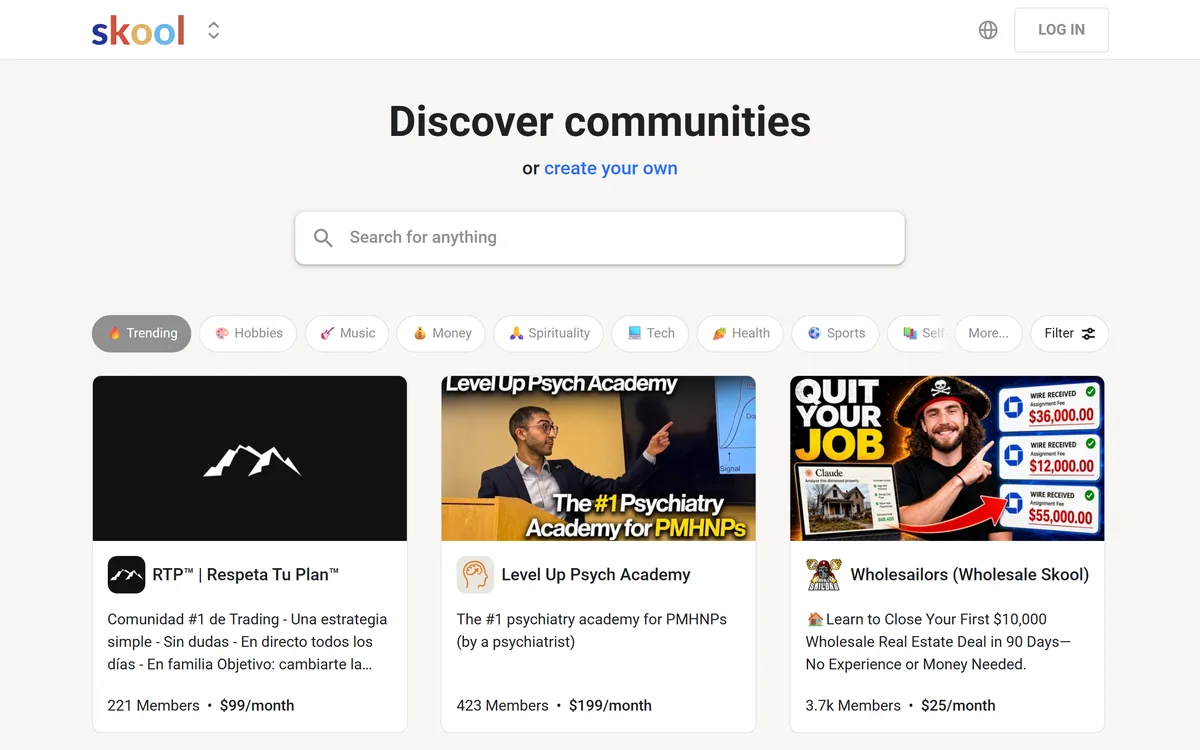
The pitch is simplicity. You can set up a community in under 30 minutes, charge members immediately, and manage everything from one dashboard. Skool also has a built-in discovery marketplace with over 25 million users, which gives new communities a potential audience from day one.
The tradeoff is that everything lives on Skool's platform. Your community content, your member list, your course material, your revenue data. All of it sits on Skool's infrastructure, under Skool's terms.
Pricing: The Real Math
This is where the comparison gets spicy.
Skool pricing (2026):
- Hobby: $9/month with a 10% transaction fee on all payments
- Pro: $99/month with a 2.9% transaction fee
That transaction fee on the Hobby plan is the detail most people gloss over. If your community generates $5,000/month in membership revenue, Skool takes $500 off the top. Every month. On top of whatever your payment processor charges.
Even on the Pro plan at $99/month ($1,188/year), you're still paying 2.9% on every dollar your members pay you.
MemberPress pricing (2026):
- Launch: $199.50/year (4.9% transaction fee)
- Growth: $349.50/year (0% transaction fees)
- Scale: $499.50/year (0% transaction fees)
On MemberPress Growth, you pay $349.50 per year and keep every dollar your members pay you (minus standard Stripe or PayPal processing fees, which you'd pay on any platform).
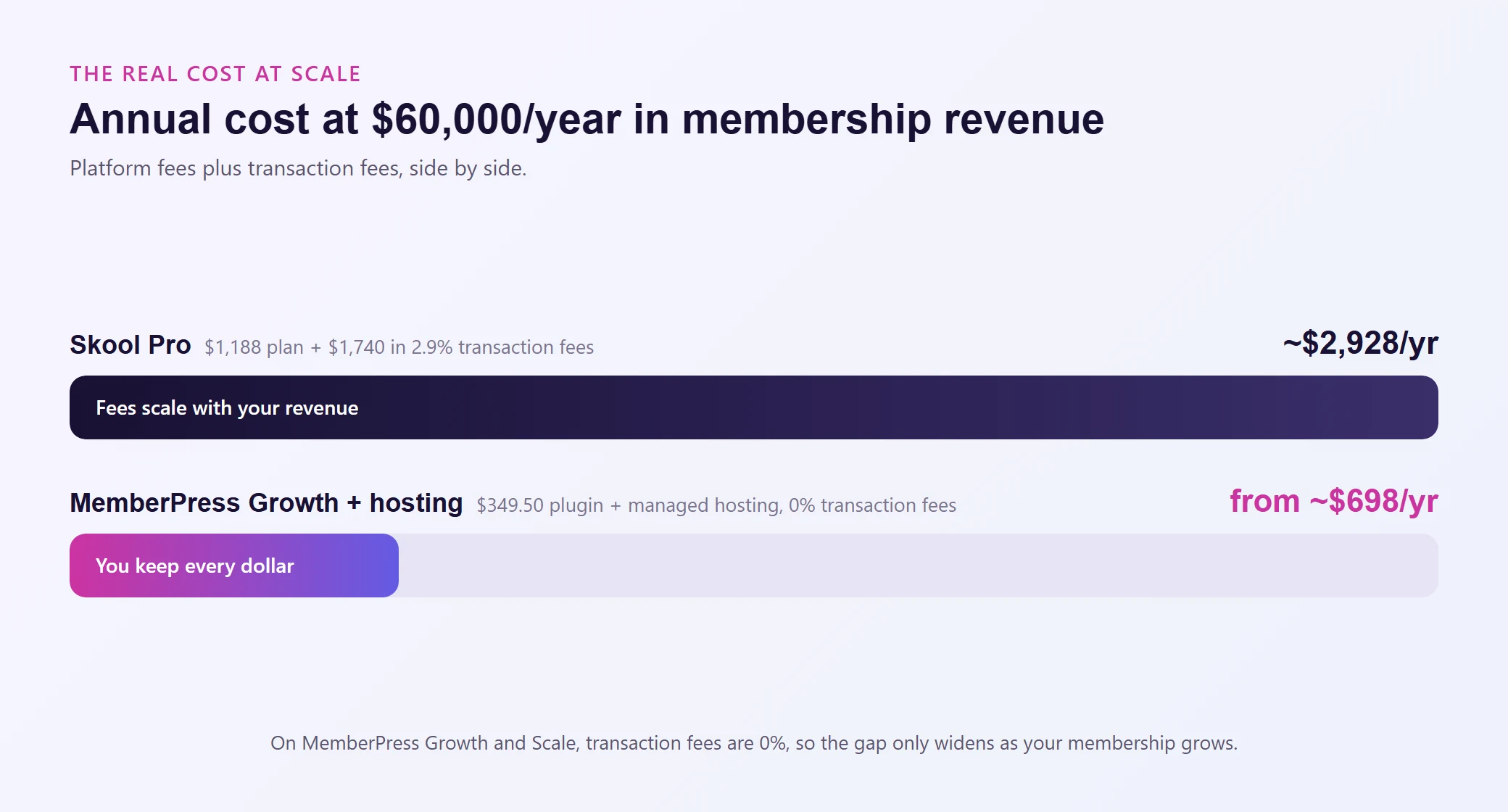
Let's do some quick math. Say your membership generates $5,000/month ($60,000/year):
Skool Pro: $1,188/year platform fee + $1,740/year in transaction fees (2.9%) = $2,928/year
MemberPress Growth + managed hosting: $349.50/year plugin + $348 to $1,188/year hosting = $697.50 to $1,537.50/year
That's roughly half the cost, or less. And the gap only widens as your revenue grows. At $20,000/month in membership revenue, Skool Pro's transaction fees alone hit $6,960/year.
MemberPress Growth's transaction fee at that revenue level? Zero.
Community is Skool's main selling point, and it does it with a specific philosophy: one community feed, gamification, and simplicity.
Skool's community model:
- A single activity feed (think Facebook Groups, but inside Skool)
- Up to 10 categories for organizing posts
- Gamification with points, levels, and leaderboards
- Member levels that unlock content as members engage
- Events and calendar for live calls
- A discovery marketplace where potential members can find your community
For small, engaged communities (under a few hundred members), this works beautifully. The feed is clean, engagement is visible, and the gamification creates a sense of progression.
The problem surfaces when your community grows. Ten categories that feel organized at 50 members start feeling cramped at 500. Everything flows through one feed, so conversations from different topics collide. There's no way to create sub-groups, private spaces for different membership tiers, or dedicated discussion areas for specific programs.
MemberPress community (via ClubSuite):
- Unlimited discussion forums (not a single feed)
- Member directories with profiles
- Sub-groups for different programs, tiers, or topics
- Activity feeds within each group
- Private spaces for premium members
- No cap on categories or organizational structure
ClubSuite gives you a community architecture that scales. You can create separate spaces for your free members, paid members, coaching clients, and course students, each with their own discussions, without everything piling into one feed.
If you're building a community you expect to grow beyond a few hundred people, the structural difference matters. A lot.
Course and LMS Features
Both platforms let you host courses, but the depth is dramatically different.
Skool keeps courses minimal. You can organize content into modules, upload videos, and that's essentially it. There are no quizzes, no assignments, no certificates, no drip scheduling, no gradebook. If your "course" is really a collection of training videos that members watch at their own pace, Skool handles it fine.
MemberPress Courses is a full LMS:
- Drag-and-drop curriculum builder
- Nine quiz types (not just multiple choice)
- Graded assignments with instructor feedback
- Completion certificates
- Content dripping with flexible scheduling rules
- A full gradebook for tracking student progress
- An AI course generator for faster content creation
- Course progress tracking per student
If you're running a professional certification, a structured training program, or any course where assessment and completion tracking actually matter, Skool doesn't have the tools. MemberPress does.
This isn't about Skool being bad at courses. It's that Skool wasn't built as an LMS. It was built as a community platform that happens to host video content. MemberPress was built as a membership platform with a real learning management system baked in.
If coaching is part of your business, this section is short.
Skool has no coaching-specific features. No client management. No milestone tracking. No scheduling integration. No private coach-to-client messaging. If you want to run coaching on Skool, you're stitching together workarounds with external tools.
MemberPress has CoachKit, a purpose-built coaching management system:
- Unlimited coaching programs
- Milestone and habit tracking per client
- Automated client onboarding workflows
- Built-in scheduling (integrates with Calendly and Simply Schedule Appointments)
- Real-time coach-client messaging (on the Scale plan)
For creators who sell coaching alongside memberships or courses, this isn't a nice-to-have. It's a core business tool that would cost hundreds per year to replicate with separate software.
Ownership and Data Control
This is the part of the comparison that doesn't show up in feature tables but could be the most consequential decision you make.
With Skool, your community, your member list, your course content, your revenue history, all of it lives on Skool's servers. You're operating under their terms, their pricing structure, and their product roadmap. If Skool changes its transaction fees, limits features, or shuts down a community for a terms-of-service violation (something users have reported on review platforms), your business takes the hit.
There's no export button that gives you a clean copy of your community discussions. Your member engagement data, your posts, your community history, it stays with Skool.
With MemberPress on WordPress, everything is yours. Your member database, your course content, your payment records, your community data. It all lives in your WordPress database, on your own hosting, under your own domain. You can back it up, migrate it, or build on top of it with any tool in the WordPress ecosystem. No permission required.
If you ever want to change hosting providers, switch to a different community plugin, or restructure your entire membership, you can. The data goes where you go.
For anyone building a business they plan to run for years, platform independence isn't a philosophical preference. It's risk management.
Integrations and Flexibility
Skool takes a walled-garden approach. The platform does what it does, and that's about it. There's no native integration with email marketing platforms, CRMs, payment systems beyond Stripe, analytics tools, or automation platforms. If you want Skool to talk to ActiveCampaign, ConvertKit, or your CRM, you're looking at Zapier or third-party middleware.
Skool also doesn't include email marketing. You'll need a separate tool for email sequences, broadcasts, and subscriber management.
MemberPress integrates directly with:
- Email platforms: ActiveCampaign, ConvertKit, Mailchimp, Drip, and more
- Payment processors: Stripe, PayPal, Square, Authorize.net
- Automation: Zapier, Uncanny Automator, WP Fusion
- Analytics: MonsterInsights, Google Analytics
- LMS partners: LearnDash integration
- Plus the entire WordPress plugin ecosystem
Because MemberPress runs on WordPress, you're not limited to what one company decides to build. Need affiliate tracking? There's a plugin for that (MemberPress Scale includes Easy Affiliate). Need advanced analytics? Install MonsterInsights. Need a custom checkout flow? Build it with WordPress tools.
The flexibility gap between a WordPress-based stack and a closed SaaS platform compounds over time. The more your business grows, the more you'll need tools that Skool simply doesn't offer.
The Discovery Marketplace Argument
Skool's built-in discovery marketplace is a legitimate differentiator. With over 25 million users browsing communities on Skool, there's a real chance new members find you organically through the platform itself.
Worth noting, though: most successful Skool communities don't rely on marketplace discovery. They drive traffic through YouTube, podcasts, social media, and paid ads, the same channels you'd use with MemberPress. The marketplace is a bonus, not a business strategy.
And it comes with a tradeoff. Your community lives in Skool's ecosystem, surrounded by competing communities. Members can browse other groups in the same niche with one click. On your own WordPress site, members land in your world, with your branding, your navigation, and no sidebar of competitors.
Here's a dimension most MemberPress vs Skool comparisons skip entirely.
With Skool, performance is whatever Skool gives you. You can't optimize anything. If the platform feels slow during a live event or your community feed lags under heavy activity, your only option is to wait for Skool to fix it.
With MemberPress on WordPress, your site's speed and reliability depend on your hosting. A community site with hundreds of logged-in members is a dynamic workload. Every page load, every forum post, every course progress check hits the database. Generic shared hosting struggles with this.
Hosting built for dynamic WordPress workloads handles it differently. Object caching keeps repeated database queries from bogging down your server. Auto-scaling PHP workers handle traffic spikes during live events or launches. A global CDN ensures fast load times regardless of where your members are located.
The combination of MemberPress plus purpose-built hosting isn't just cheaper than Skool. It can be meaningfully faster, because you're choosing infrastructure optimized for exactly how community and membership sites work.
Who Should Choose Which?
It comes down to how much you value ownership, feature depth, and cost control versus all-in-one simplicity.
| Choose MemberPress if you... |
Choose Skool if you... |
| Want full ownership of your community, data, and content |
Want the absolute simplest setup possible (under 30 minutes) |
| Need real course features (quizzes, assignments, certificates, gradebook) |
Are building a community-first business where discussion is the main product |
| Run coaching programs and need dedicated management tools |
Value Skool's gamification (leaderboards, levels, points) as a core engagement strategy |
| Care about long-term cost efficiency, especially as revenue grows |
Want built-in discovery through Skool's marketplace |
| Want deep integrations with email, CRM, and analytics tools |
Don't need structured courses, coaching tools, or advanced LMS features |
| Are building a membership business you plan to own for years |
Are comfortable with platform dependency and Skool's transaction fee structure |
| Already use WordPress or plan to build on it |
Prefer a single, opinionated tool over a customizable stack |
Wrapping Up
Skool and MemberPress approach community building from opposite philosophies. Skool gives you one streamlined tool with a specific way of doing things. MemberPress gives you a flexible, feature-rich platform where you own everything and can build exactly what your business needs.
For creators testing an idea or running a small, discussion-focused community, Skool's simplicity is genuine. But for anyone building a membership business they expect to grow, one where courses, coaching, integrations, and cost efficiency actually matter, MemberPress on WordPress is the stronger foundation. You keep more of your revenue, own all your data, and never have to worry about a platform decision pulling the rug out from under you.
The piece that connects it all is your hosting. A thriving community site with hundreds or thousands of active, logged-in members needs infrastructure built for that exact workload. Choose hosting that handles dynamic WordPress sites, and you get the best of both worlds: MemberPress's flexibility with the performance your members expect.