Your site is already backed up automatically every day. Now, for sites that change more often, you can shrink that backup window down to roughly one hour.
Hourly Backups is a new Levamo add-on that creates backups throughout the day and night, giving you a much more recent restore point if something goes wrong.
Why Hourly Backups?
Daily backups work well for many sites. But if your site changes throughout the day, a lot can happen between two daily backups.
A busy store may take new orders every few minutes. A membership community may add signups, posts, comments, and profile updates all day long. A content site may publish or edit multiple pieces on a tight schedule.
If something goes wrong in the afternoon, restoring from last night's backup could mean recreating hours of work: lost orders, missing form submissions, new member activity, and unpublished edits. Hourly Backups helps close that gap, so you can restore from earlier today instead of yesterday.
We recommend Hourly Backups for stores, membership communities, LMS sites, directories, job boards, and any site where new data is created throughout the day.
How It Works
In your Levamo dashboard, open the site you want to manage, then go to Backups > Backup settings. You'll see a new Hourly backups toggle.
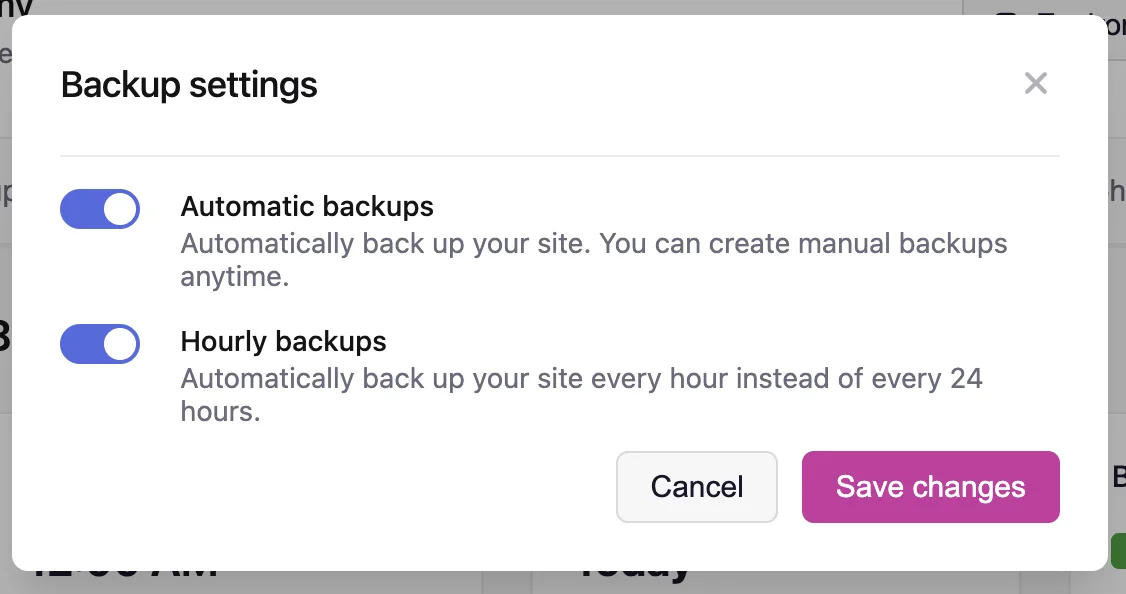
When hourly backups are off, your site keeps backing up every 24 hours at the time and timezone you choose. This is the default and works exactly as it does today.
When hourly backups are on, Levamo creates a backup roughly once per hour. Each new backup appears in your Backups list labeled Hourly backup, right alongside your existing ones.
You can switch a site back to daily backups anytime. Turning hourly backups off does not delete the backups you've already taken.
Pricing
Hourly Backups is a $10/month add-on per site, or $120/year per site on an annual plan.
That is a fraction of what other managed hosts charge for hourly backups. Kinsta, for example, charges $100 per site per month for an hourly backup schedule, ten times our price. At Levamo, our goal is to offer the same value for less, so you can protect more of your sites without the cost piling up.
How Licenses Work
Each Hourly Backups license can be attached to one site at a time. You can move it to a different site later by turning hourly backups off on the first site, then enabling it on another. No new purchase needed.
Sites that need hourly backups at the same time each need their own license. Staging sites count as separate sites, so they need their own license too.
Available Now
Hourly Backups is available now. In your Levamo dashboard, open the site you want to back up hourly, then go to Backups > Backup settings.
If you don't have the add-on yet, the Hourly backups setting shows an upgrade link so you can add it to your plan. You can review and manage your add-ons anytime in Billing Settings.
Need help deciding which sites should use hourly backups? Our team is available on live chat and happy to help you set it up.